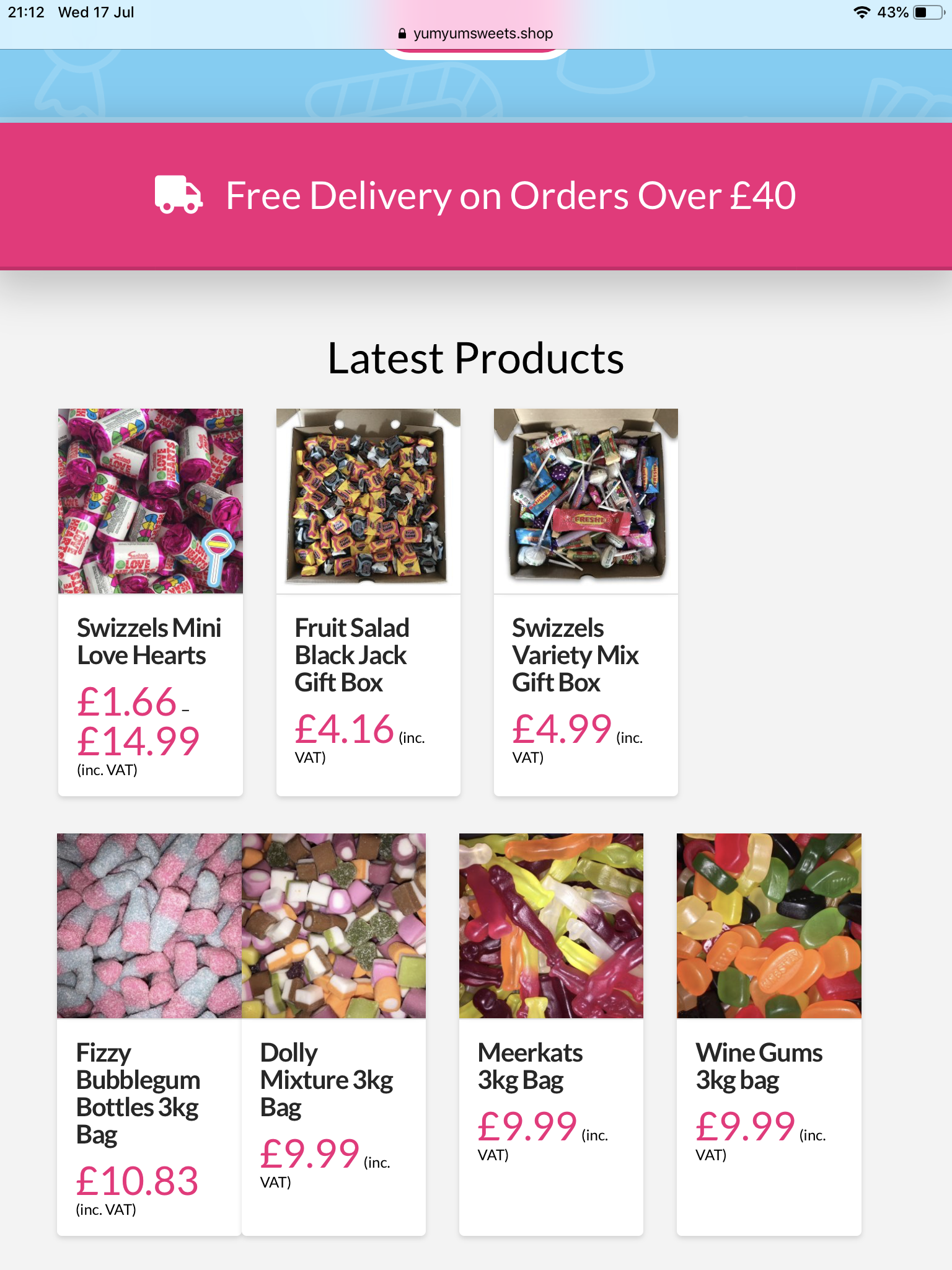
Woocommerce product columns on ipad

Hi
You very kindly gave me some code to show 4 product columns instead of 2 on iPad. This worked although some columns are split and some products are closer together. The css you gave was:

@media (max-width: 979px) and (min-width: 690px){
.woocommerce li.product.first {
clear: both!important;
}
.woocommerce .cols-3 li.product, .woocommerce .cols-4 li.product, .woocommerce.columns-3 li.product, .woocommerce.columns-4 li.product {
width: 22% !important;
}
.woocommerce .cols-3 li.product:nth-child(2n+2), .woocommerce .cols-4 li.product:nth-child(2n+2), .woocommerce.columns-3 li.product:nth-child(2n+2), .woocommerce.columns-4 li.product:nth-child(2n+2) {
margin-right: 4%;
}
.woocommerce .cols-3 li.product:nth-child(2n+3), .woocommerce .cols-4 li.product:nth-child(2n+3), .woocommerce.columns-3 li.product:nth-child(2n+3), .woocommerce.columns-4 li.product:nth-child(2n+3) {
clear: none;
}
.woocommerce li.product.last {
margin-right: 0!important;
}
}

Would you be able to assist me to correct this please? The url is www.yumyumsweets.shop

Hi @Daines,

Were you able to get this sorted? I have just checked and the products are evenly distributed in 4 columns on iPad:

If it is displaying differently on your end, try to clear your browser cache and check again.

Hope this helps.

Hi @jade
This is not yet resolved, this is what I’m seeing. I’ve refreshed my cache.

Hello @Daines,

Please keep in mind that since you have installed a caching plugin Swift Performance Lite Cache, please clear your plugin cache and regenerate the minified JS/CSS files before testing your site. This can cause the changes to not take place on the front end. It will eventually show up when the cache regenerates, but it’s not ideal if you’re looking to see your changes immediately. Caching plugins are best to turn on only when you’ve finished building the site.

In your iPad, clear the browser cache as well. Or you just make use of the private browsing mode and test your page again.

Please let us know how it goes.

Hi @RueNel
I have done all of the above and still the same, if I rotate landscape they are fine. I’m using an iPad Pro 9.7. If I use a device emulator it appears fine on most devices but not all. Have you checked this using an emulator?

I can get them to display correctly if I reduce the column width value to 21% but then the 4 columns appear more left aligned to the page as a whole.

Hello @Daines,

Can you please update the code and use this:

@media (max-width: 979px) and (min-width: 690px){
  .woocommerce li.product.first,
  .woocommerce .cols-3 li.product:nth-child(2n+1), .woocommerce .cols-4 li.product:nth-child(2n+1), .woocommerce.columns-3 li.product:nth-child(2n+1), .woocommerce.columns-4 li.product:nth-child(2n+1) {
    clear: both!important;
  }

  .woocommerce .cols-3 li.product, .woocommerce .cols-4 li.product, .woocommerce.columns-3 li.product, .woocommerce.columns-4 li.product {
    width: 22% !important;
    margin-right: 4%;
  }

  .woocommerce .cols-3 li.product:nth-child(2n+2), .woocommerce .cols-4 li.product:nth-child(2n+2), .woocommerce.columns-3 li.product:nth-child(2n+2), .woocommerce.columns-4 li.product:nth-child(2n+2) {
    margin-right: 4%;
  }

  .woocommerce .cols-3 li.product:nth-child(2n+3), .woocommerce .cols-4 li.product:nth-child(2n+3), .woocommerce.columns-3 li.product:nth-child(2n+3), .woocommerce.columns-4 li.product:nth-child(2n+3) {
    clear: none;
  }

  .woocommerce li.product.last,
  .woocommerce .cols-3 li.product:nth-child(2n+4), .woocommerce .cols-4 li.product:nth-child(2n+3), .woocommerce.columns-3 li.product:nth-child(2n+4), .woocommerce.columns-4 li.product:nth-child(4n+4) {
    margin-right: 0!important;
  }
}

Please let us know how it goes.

Hi @RueNel
I am using your css at the moment, it didn’t work so i changed the column width value to 21.96% and this appears to look okay, any more than this and the same thing happens. Thank you for your help.

No problem Daines.
If you need anything else we can help you with, don’t hesitate to open another thread.

Hi @RueNel
The problem appears now on my main shop page https://www.yumyumsweets.shop/shop/. The columns work fine on my home page where I’m using short code to display the desired categories. Any ideas please?

Hi @Daines,

Sorry but I don’t see that issue on that page, what I see is a three-column row, if you want to show that as four columns instead, please change that in the Theme Options > WooCommerce > Shop Columns

Hope it helps,
Cheers!

Hi @friech
Can you please view this on iPad screen size. Desktop is fine. Here is what i’m seeing. As you can see the spacing is off. It looks fine on the homepage where shortcode is used.

Hello Daines,

Do you want to display three columns in desktop screens and 4 columns on the iPad? If that is the case, please have your custom css be updated and use this code instead:

@media (max-width: 979px) and (min-width: 690px){
  .woocommerce li.product.first,
  .woocommerce .cols-3 li.product:nth-child(2n+1){
    clear: both!important;
  }

  .woocommerce .cols-3 li.product{
    width: 22% !important;
    margin-right: 4%;
  }
  
  .woocommerce .cols-3 li.product.last,
  .woocommerce .cols-3 li.product:nth-child(1n+2){
    margin-right: 4%;
  }

  .woocommerce .cols-3 li.product:nth-child(2n+3),
  .woocommerce .cols-3 li.product.last {
    clear: none;
  }


  .woocommerce .cols-3 li.product:nth-child(4n+4){
    margin-right: 0!important;
  }
}

We would love to know if this has worked for you. Thank you.

Hi @RueNel
I don’t think i’ve explained myself well enough. I already have 3 columns on desktop and 4 columns on iPad using the css which you kindly supplied at the start of the thread. What i’m trying to achieve is uniformed spacing between the products on iPad screen size. The screenshot i posted before shows that some products are stuck together whilst others have a 4% spacing. Do you have any idea why some products are stuck together?

Hello @Daines,

This update css code will resolve your issue:

@media (max-width: 979px) and (min-width: 690px){
  .woocommerce li.product.first,
  .woocommerce .cols-3 li.product:nth-child(2n+1){
    clear: both!important;
  }

  .woocommerce .cols-3 li.product{
    width: 22% !important;
    margin-right: 4%;
  }
  
  .woocommerce .cols-3 li.product.last,
  .woocommerce .cols-3 li.product:nth-child(1n+2){
    margin-right: 4% !important;
  }

  .woocommerce .cols-3 li.product:nth-child(2n+3),
  .woocommerce .cols-3 li.product.last {
    clear: none;
  }


  .woocommerce .cols-3 li.product:nth-child(4n+4){
    margin-right: 0 !important;
  }
}

There was a conflict in the previous given css which is why you need to update it.

Hi @RueNel
That has worked for the shop page but now I have lost the 4 column layout on my homepage when viewed with an iPad. Any ideas

Hi @RueNel
I appear to have solved this by combining the original code given at the start of the post and changing the shop columns number to 4 in the woocommerce theme options. Thanks so much for you help, awesome as always!

You’re welcome!
We’re glad we were able to help you out.

This topic was automatically closed 10 days after the last reply. New replies are no longer allowed.