Hello ,
I would like to do this things:
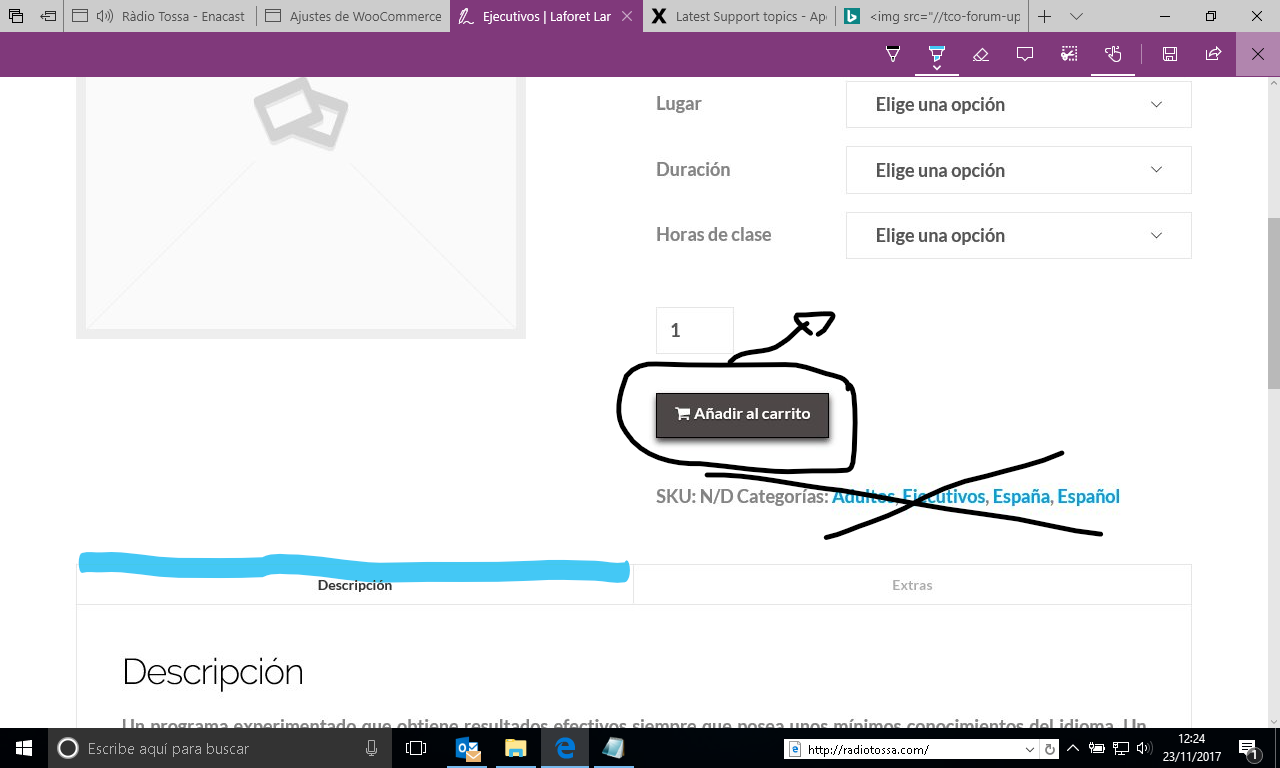
- ad to cart move to the position of the image. And I would like to change the color.
- Remove sku and categorías of the page. look image.
- Hover this color #34495e Look image.
Thanks a lot.
Regards,
Hello ,
I would like to do this things:
Hi,
To achieve that, you can add this in Theme Options > CSS
.single-product .cart .quantity {
    float: left;
    margin-right: 10px;
}

.single-product .cart button[name="add-to-cart"] {
    float: left;
}

.x-nav-tabs > .active > a, .x-nav-tabs > .active > a:hover {
    box-shadow: inset 0 3px 0 0 #34495e;
}
Hope that helps.
Thank for your message . I did it but the css do not do anything,
Hi again,
Thank you for providing the credentials, I checked your Customizer and there are missing curly brackets in there, that’s why the code you’ve added isn’t working. Please review your code and fix the errors so the code you add works.
However I added the following code in the start of Customizer:
.single-product .cart .quantity {
    float: left;
    margin-right: 10px;
}
.single-product .product_meta {
    display: none;
}
.single-product .cart button[name="add-to-cart"] {
    float: left;
}

.x-nav-tabs > .active > a, .x-nav-tabs > .active > a:hover {
    box-shadow: inset 0 3px 0 0 #34495e;
}
This has fixed the issue but make sure to fix all the errors in your code. You can also find errors by pasting your CSS code here https://jigsaw.w3.org/css-validator/#validate_by_input
Cheers!
This topic was automatically closed 10 days after the last reply. New replies are no longer allowed.