Woocommerce Image and Heading Alignment

Hi,

An alignment error has crept into this website on Woocommerce product pages. The heading, price, quantity, etc. should all be to the right of the product’s image at larger screen resolutions. However, they have slipped to below the image (see screenshot). An example of this can be found at https://www.carolineingraham.com/store/herbs-minerals/barley-grass-powder/

Strangely, in the Pro Theme Options view, the heading and other fields are correctly placed to the right of the product image.

I have looked to see if any custom CSS is doing this, but cannot find anything obvious. Do you have any suggestions to correct the alignment?

Thanks,
Christopher

Hey Christopher,

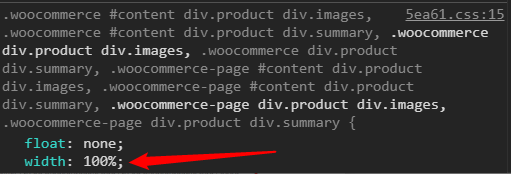
It certainly is coming from custom CSS. All CSS in your site is combined though so you can’t tell where’s that CSS coming from so I’d suggest that you do the steps in the list below.

image

  • You’re using a child theme and the custom CSS could be coming from there. Switch to the parent theme to quickly test that.
  • Remove all custom CSS in Theme Options > CSS and every area where you’ve added custom CSS
  • Deactivate all third-party plugins because maybe one of the plugin’s CSS is causing the issue.

I’d just like to clarify that this is not a theme issue. This has something to do with 3rd party code therefore we cannot provide support for this.

Hope that leads you to the right direction and thank you for understanding.

Hi Christian,

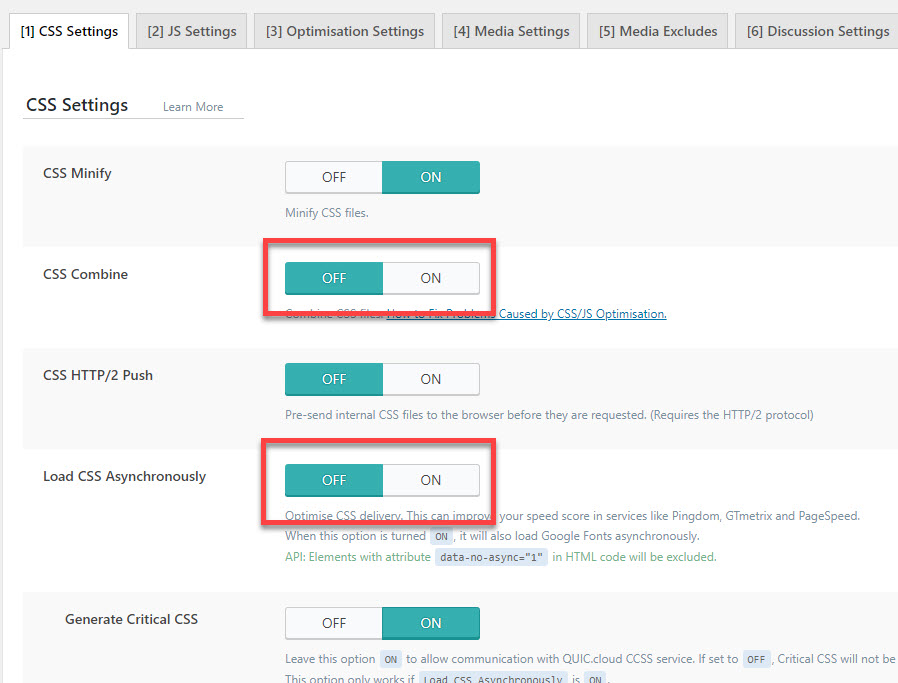
Thanks for the helpful guidance tips. It turns out that it was the caching plugin - LiteSpeed Cache - which caused the problem. The two setings in the screenshot were originally turned on and have now been switched off. This has rectified the problem.

Thanks again for the help,
Christopher

Glad that we could be of help Christopher.

Cheers!

This topic was automatically closed 10 days after the last reply. New replies are no longer allowed.