Hi Team / @alexander
Seems there’s a bit of a gap with the new WooCommerce Index/Product layout and new WooCom Field options, unless I’m missing something.
Is there the ability to show a Variable products price range (ie. “lowest price” - “highest price”) within both the Product Index layout, and the Single Product layouts, using the WooCommerce pricing fields? Or do additional fields need to be added from your end to achieve this? As this is currently set by default within the Stacks of Pro.
Default Integrity Stack price on front-end - Shows the price range of a variable product by default ($16.00 - $25.00):

New Product Index ‘layout’ within Pro on front-end, showing the base price only of a Variable Product:

New Single Product ‘layout’ within Pro on front-end, showing the base price only ($15.00) using the Price field, but showing a variable price ($30.00) when selecting a different Weight:

Showing input of WooCommerce Price field - which is provided by default by Themeco within the Single Product layout - only showing $15.00:

Different field options available by default - no variable options?
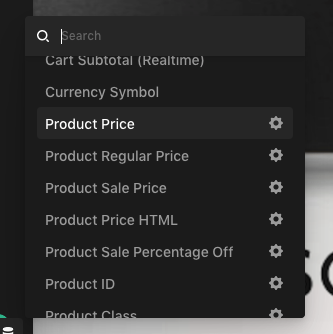
If there is no ability to render the Price ranges of Variable products in the new Layouts, then this is a step backwards from the default stack functionality, and essentially renders the whole new WooCommerce layout functionality useless. Variable Product pricing is a basic element of WooCommerce and any online store for that matter.
Hopefully we can work through this to get it fixed, or hopefully I’m missing something super easy to sort this…
Thanks
Sam
