Woocommerce Endpoints Crash in Cornerstone

Hello,
I’m retrieving this error when loading Woocommerce endpoints (Account, Order, etc.) in Cornerstone.

The preview could not load. This is most often related to a plugin conflict or aggressive page cacheing. Checking the developer console for errors could indicate what went wrong.

I’ve increased memory limit to 512M.

The developer console shows these errors:

Uncaught TypeError: Cannot read property ‘substr’ of cs.js?ver=2.1.7:32998 undefined
at HTMLAnchorElement.navigateHandler (cs.js?ver=2.1.7:32998)
at HTMLBodyElement.dispatch (jquery.js?ver=1.12.4:3)
at HTMLBodyElement.r.handle (jquery.js?ver=1.12.4:3)

Response for ?cs-launch=1:1 preflight is invalid (redirect)

Please look at the 4th error in the Secure Note. This line in media.php causes an error:

if ( ! $src_matched || count( $sources ){

I’m not formally trained in PHP but have ascertained that $sources is not an array as required by the count() function.

Uh… any suggestions?
Additional debug information.

Hey Chad,

Errors aside, would you mind giving us the steps to replicate this issue? We need to know if the cause of this issue is coming from Cornerstone and not other plugins. Did you also test using X parent theme and the default WordPress theme?

Thanks.

I did not test this using other themes and encounter the issue simply by trying to access these pages in cornerstone. I’ve found a workaround for the moment.

Glad you’ve found a workaround. I’m not sure how you’re arriving to edit the endpoints in Cornerstone but the endpoints could not be edited with Cornerstone because they are special WooCommerce pages and don’t have content like a post or page. WooCommerce custom development is needed to add content to endpoints.

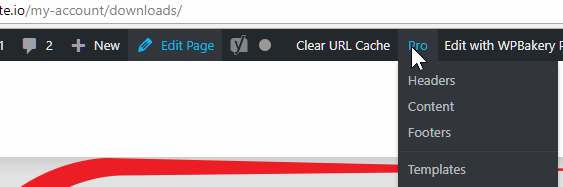
The screenshot below shows that there’s no edit page under the Pro menu. Clicking “Edit Page” will lead you to the my-account page.

Thanks.

Hi there,
I’ve dropped short-codes into pages and designated them checkout, cart, accounts, etc. Cornerstone reveals each page title in the content menu. Selecting an endpoint page causes this error.

It’s not a huge deal anymore. I figured you might want it brought to your attention.

Hey There,

Thanks for the feedback. It has been noted.
If you need anything else we can help you with, don’t hesitate to open another thread.

Regards.

This topic was automatically closed 10 days after the last reply. New replies are no longer allowed.