Hi,
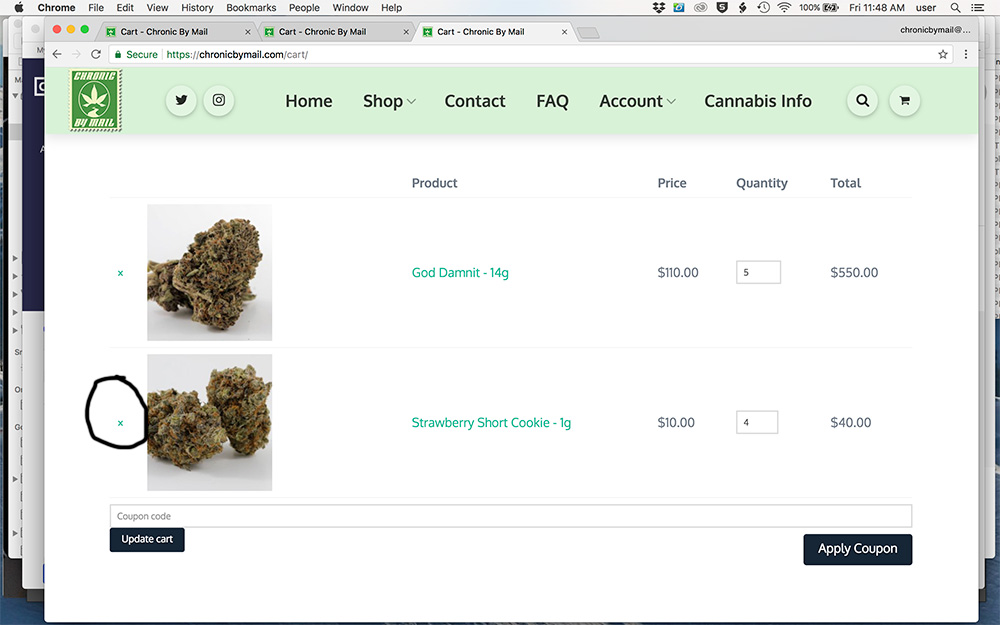
The small ‘x’ on the left side of the cart page does not work.
Clicking it does not remove the item.
If i reduce the quantity and update cart it will work.
I recently set up cloud flare
any help is greatly appreciated.
thanks,
brent
Hi,
The small ‘x’ on the left side of the cart page does not work.
Clicking it does not remove the item.
If i reduce the quantity and update cart it will work.
I recently set up cloud flare
any help is greatly appreciated.
thanks,
brent
Hello There,
Thanks for writing in! I can confirmed that you cannot remove any product in your cart page. I do not see any error JS error on the page. This must be a caching issue. Please clear your site cache since you are using WP Rocket. And also I noticed that you are using CloudFlare. Purge your site cache and please make sure that you are using the recommended CloudFlare setting which can be found here: https://xthemetips.com/using-cloudflare-rocket-loader-with-x-pro-and-x5/928/
And lastly, in your CloudFlare, the JS and CSS must not be minified. This can be found in CloudFlare > Speed tab.
Hope this helps.
Hi,
I have followed the instructions on https://xthemetips.com/using-cloudflare-rocket-loader-with-x-pro-and-x5/928/ and have purged, cleared and flushed wp-rocket and cloudflare caches after following said instructions
I have all minification turned off in cloudflare and wp-rocket
i am still unable to remove products from the cart
your continued support is greatly appreciated 
thanks
Brent
Hi there,
I double checked the case and found out the problem is the version of the Woocommerce you are using. Our theme is not compatible with Woocommerce version 3.3.X at the moment. Our development team are working to release a compatible version, but at the moment you will need to revert back to version 3.2.6:
http://codespotsupport.com/kb/how-to-downgrade-woocommerce-plugin/
Thank you for your understanding.
Hi,
I reverted back to 3.2.6 but woo commerce failed to load my category and product pages.
any ideas when the dev team will push a new release?
thanks,
Brent
Hey Brent,
We do not have an ETA. We are already in a Beta 3 testing phase. Once we are done, it will be out as soon as possible.
Please bear with us.
This topic was automatically closed 10 days after the last reply. New replies are no longer allowed.