WooCommerce direct checkout page

Hello,

I have installed WooCommerce which came with X theme PRO.

I then installed “WooCommerce Membership” add-on which allows to create membership website.

WooCommerce have their own classic style where you:
1. Choose product on their own classic page 2. Add it to cart 3. Checkout
Its a long procedure and commonly used for buying variety of retail products.

My website on the other hand is very simple, its a subscription website. Where you choose one of 3 plans, purchase them and have all the access to websites content.

This is the link to my price plan template generated by integrity http://hazlive.com/registration/

I want to link Woocommerce “Checkout page” directly to the “continue” buttons and get rid of the cart, how to achieve that?

So visitors could view the page, then click the continue button and proceed directly to checkout.

Hope you can help me,

Thank you.

Hello There,

Thanks for writing in! Regretfully we cannot check your site at the moment because there is an on going error.

We already responded your thread regarding this error. We will resolve that first and then this issue next in line.

Please let us know how it goes.

I downloaded “WooCommerce one page checkout” plugin and it did the work, but I have faced 2 problems:

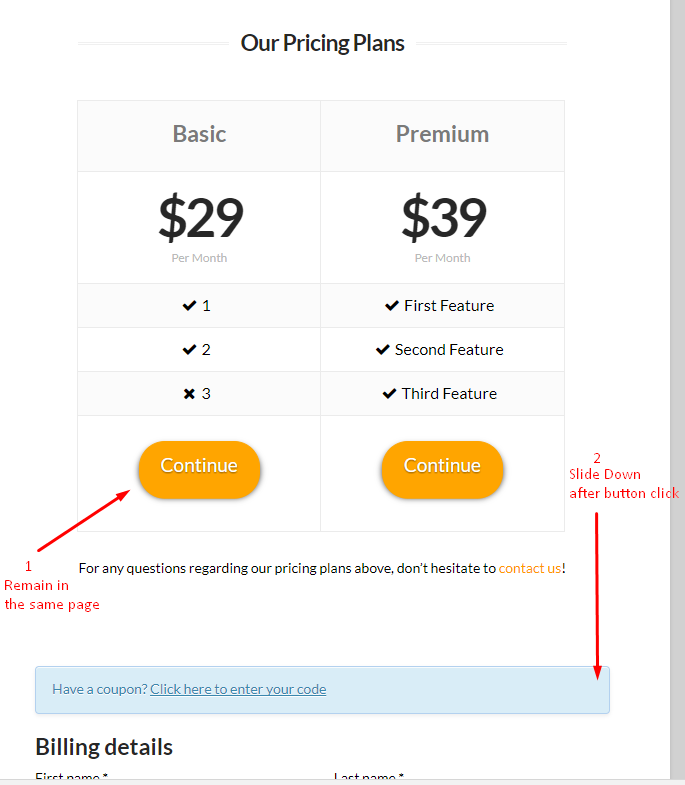
  1. Once I click “Continue” Button im redirected to the main page. How do I make it stay in the same page after click?
  2. Once I click the “Continue” button how do I make the page slide down? (X editor aka cornerstone cant edit this page for some reason)

Could you please help with this 2 issues,

Thank you

Hi there,

Regretfully those 2 sections are related to the 3rd party plugin which we do not have any control over. You will need to contact the plugin developer to get help from them as support for 3rd party plugins is out of our support scope.

It seems that the plugin added a specific page which Cornerstone can not detect.

Thank you.