I’m trying to clean up any/all errors on my multisite-site (not sure if that makes a difference here or not).
Also worth noting, I’m using the PRO Theme (upgraded a year+ ago from X)
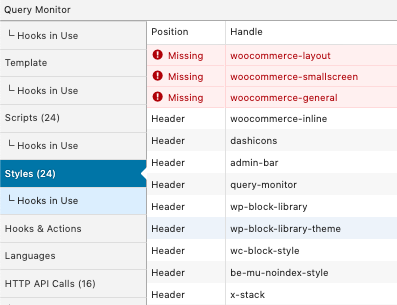
Using the Query Monitor plugin, i’m noticing these errors in the “missing styles” section:
Missing: woocommerce-layout
Missing: woocommerce-smallscreen
Missing: woocommerce-general
As I haven’t noticed any visual issues, I’m going to assume that they’ve been replaced with WooCommerce child templates in Pro. BUT, I’d like to safely resolve the issues so those warnings go away.
And as a side note, but on the topic of Pro & WooCommerce… I (well, one of my staff) found an odd css glitch.
When you click on the magnifying glass on a product, there’s some z-index/layering issues with the lightbox. I was able to resolve it (across the entire multi-site install) by adding the following CSS into the child’s style.css… but this should probably be addressed up-stream in the next release.
.pswp {z-index: 10000!important;}