Woocommerce checkout issues 5/12

Hi there, I’m adding woocommerce to a site using PRO, which I have done many times before, but for some reason this time I’m having several issues.

  1. In the cart off canvas element in the header, the checkout button redirects to the homepage instead of the cart, and I can’t for the life of me figure out how to change this.

and

  1. The checkout page looks brutal. It used some of the theme attributes in some places, like some of the text. I’m using Montserrat, which displays in some place like “Billing Details” but all of the other headings like “First name*” are in something that looks like courier. Also, there are mysterious grey boxes scattered throughout the page. I’ve attached a screenshot.

Any ideas about how I can resolve these issues?

Hi Ken,

I checked your licenses page and there are many licenses that I am not sure which one you are talking about. That is why I can not give an exact solution, but I do suggest that you follow the steps below:

  1. Ensure everything is up to date according to our version compatibility list here. Please follow the best practices when updating your theme and plugins. Click here for more information.
  2. Test for a plugin conflict. You can do this by deactivating all third-party plugins, and see if the problem remains. If it’s fixed, you’ll know a plugin caused the problem, and you can narrow down which one by reactivating them one at a time.
  3. Remove custom CSS and Javascript from the theme options and change the theme from Child Theme to Parent Theme and see if the problem persists.
  4. We did not check our theme against Woocommerce version 4.1.0. We have it tested for version 4.0 according to our Version Compatibility. That might be a factor, would you please use the version 4.0 and see if it works ok for you?

kindly get back to us with the result of the steps above and URL/User/Pass of your WordPress dashboard using the Secure Note functionality of the post to follow up the case if you still have problems.

Thank you.

Hi, thanks for the reply. Everything is up to date, and meets your compatibility standards as far as I can see. All the plugins are currently deactivated, and the problem still persists.

Hello Ken,

Thanks for providing the information.

1.) I can’t replicate the issue on my end. I have visited your shop page and added a product to the cart. When I click the “Checkout” button in the off-canvas, it directly goes to the checkout page.

See the secure note.

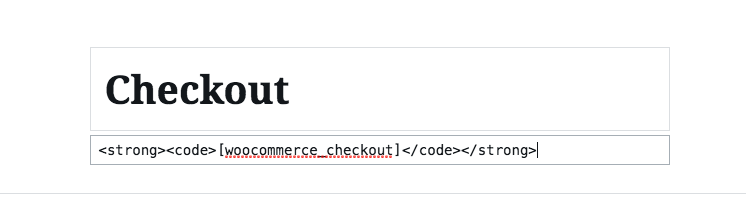
2.) The layout of your check out page is because of the unwanted HTML tag you have added.


I have removed the invalid code and only left [woocommerce_checkout] shortcode.

The issue seems to have been resolved already. Kindly check your site now.

Strange ha. Thanks for the help. In the past whenever I installed Woocommerce all of the pages were generated automatically, but for some reason they weren’t this time.

You are most welcome Ken.

This topic was automatically closed 10 days after the last reply. New replies are no longer allowed.