Hi, on my check-out page it should parse all sections with e426-1 etc as a class, however it is parsed as e0-1. Could you check what is wrong, or that this is a bug? http://nieuw.zpc-amersfoort.nl/webshop/afrekenen/
Hi @tmrikhof
It seems some issue with the rendering the blocks and shortcodes as per theme structure, I would also like to suggest you troubleshoot a few common issues for this.
If none of the above helps and you are still having the issue, please provide a screenshot marked with the issue, it will help us to diagnose the problem.
And please if you can explain the exact steps to replicate the issue at our end.
We also recommend that any WooCommerce customization should be done through template customization while following WooCommerce standard, and not with the builder.
Thanks
I have checked 1-4 without any improvements (unless it is the woocommerce plugin)
 http://nieuw.zpc-amersfoort.nl/screenshot.png
And

In the sourcecode you see where a page-id should be parsed there is the number 0.
Hi @tmrikhof,
I can confirm that the WooCommerce plugin is the reason why the class parsing is changing to something else, you can also disable the WooCommerce plugin for the meantime to check it for yourself.
Hope that helps.
Thank you.
Hi, that doesn’t help  because I need the WooCommerce AND the Pro theme to work together
Hey @tmrikhof,
I believe what Marc meant is you disable WooCommerce if you want to edit the Checkout page.
Tristup previously said that:
That is because in some server setups like in your case, the WC Checkout shortcode causes problems in the builder while it works fine in other servers.
Even if it works, we still do not support adding the checkout shortcode in the builder so please use the WordPress editor.
In the future though, we’ll have a Layout Builder which will enable you to create a template for the Checkout page. You can learn more about the Layout Builder in our June Status Report here https://theme.co/content/status-report-june-02-2020
Hope that helps.
Hi, that works. However my CSS markup by the theme automaticaly by your theme Pro are named (sections) e-1 etcetera. So the markup in this example is saved as e426-1 etc. However when I enable the plugin after the HTML is parsed as e0-1 etc. So my CSS has diferent class names as how the classes are parsed. Supported or not: I think it is a bug.
Hey @tmrikhof,
It would be a bug if we claim that we support the WooCommerce Checkout Shortcode in the builder. A bug should be fixed. But, since we do not support the WooCommerce Checkout Shortcode in the builder, there is nothing to fix.
Even if that works, it is not recommended to use the generated classes as they are dynamic or can change. You should always assign your own classes to elements.
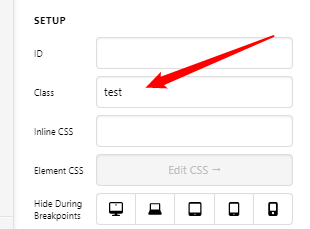

Please stay tuned for the Layout Builder.
Thank you for understanding.
This topic was automatically closed 10 days after the last reply. New replies are no longer allowed.