Woo Commerce display pictures

Every time I add new photos to my photo gallery of a product, they don’t size correctly. The last time I did this, they fixed themselves on their own after a while. The thumbnails on my main shop page also don’t display the same size, yet I haven’t messed with any sizing settings.

Checkout bison-boots.com/shop

and

https://bison-boots.com/https:/bison-boots.com/product/sample-product/the-original-bison-boot-8-inch-brown-or-black/

? Am I missing something? Thanks!

Hi @Bison_Boots

I’ve checked your website and it looks like you are using JetPack’s Image CDN feature (Photon):

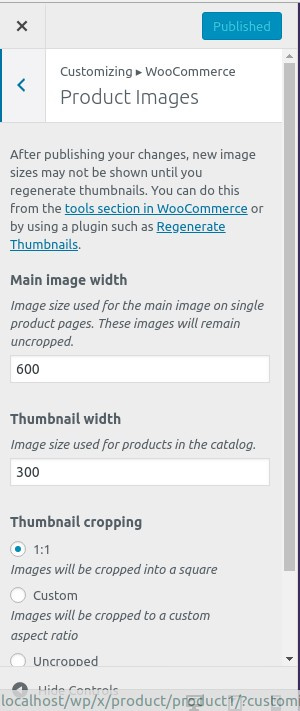
If so, then please deactivate this feature, then adjust WooCommerce product images settings in (Appearance > Customize > WooCommerce > Product Images):

Then go to (WooCommerce > Status > Tools) and click on “Regenerate shop thumbnails”.

Let me know how it goes,
Thanks.

Interesting to note, Woocommerce highly recommends Jetpack for speed optimizations; https://woocommerce.com/2018/03/speed-up-woocommerce-with-jetpack/

Shopify is looking better everyday, any plans at Theme Co to bundle in Shopify as another ecommerce option?

Hi @M72561,

It does, but you’ll have to update and purge your CDN with the latest generated images. Hence, you’ll disable it or update your CDN images right after image generations. It’s something we don’t have control so please contact Jetpack on how you can update the CDN with newer images.

As far as I recall, there is no plan for Shopify integration as of yet, but thanks for the suggestion and noted.

Thanks!

This topic was automatically closed 10 days after the last reply. New replies are no longer allowed.