Hello,
When I go to my blog posts, my footer widget shows up in the right hand side. How do I change this, so that my buttom widget does not show up in the right hand side of my blog posts.
Thanks in advance!
Hello,
When I go to my blog posts, my footer widget shows up in the right hand side. How do I change this, so that my buttom widget does not show up in the right hand side of my blog posts.
Thanks in advance!
Hello @oscarbnihrane,
Thanks for writing to us.
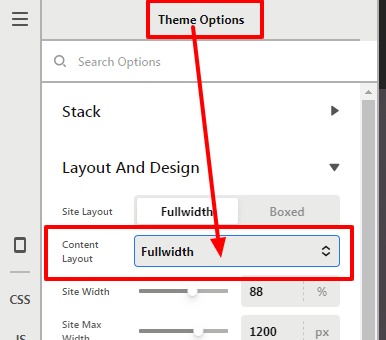
To make the fullwidth you need to set the layout as fullwidth. For that, you need to go to the X—>Theme Option —> Layout And Design–>Content Layout —>Set Fullwidth from the select box. It would disable the sidebar from all the pages and blog posts
Now you need to add the widgets in the Footer. For that, you need to go to the Appearance —>Widget —>Assign your widget in the footer widget area.
Hope it helps
Thanks
Thank you. I have not made myself clear enough. The bottom widget is already there, and it recently started appearing on the right side of the blog posts. I do not want to go to full width, because that will delete everything from full width. I’d still like to have the links and the search bar available.
So all Im looking to get rid off, is this:
Thanks in advance!
Hello Oscar,
Please go to Appearance > Widgets > Main Sidebar and remove the “Hvem Vi Er” widget because this is what is displaying in the single posts.
Kindly let us know how it goes.
Thanks it worked.
You’re welcome.
This topic was automatically closed 10 days after the last reply. New replies are no longer allowed.


