Why will Memphis Documents are not display properly on any Pro template page

On this page, https://racialequitybridge.org/resources/, this plugin’s content (which is a document library) displays correctly. It’s using just the standard wordpress content input box from the back-end and using the Default template.

If I try to embed this content [mdocs] on any ThemeCo Pro template using even the Raw Content element, it will not render correctly as shown on the previous page.

Displays correctly: https://racialequitybridge.org/resources/
Display issues: https://racialequitybridge.org/test-page/

There must be some coding on Pro template pages that somehow changes this. Please help.
Hi @MulderDSM,

Thanks for reaching out.

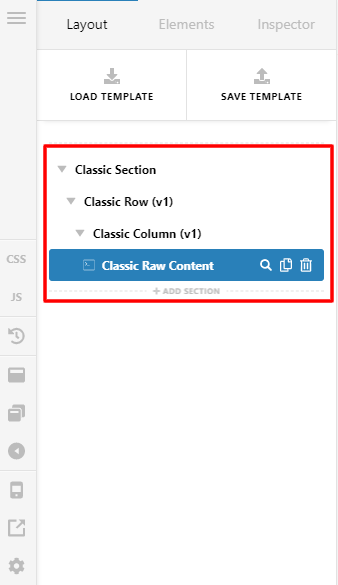
The reason why your shortcode works on the default WordPress content because the default WordPress content data is saved to 'post_content' then I suspect your plugin still using 'post_content' to save the data. Then on the Pro V2 elements, the data is saved to 'post_meta' so that’s the reason why it is not displaying properly. I suggest that you will use classic sections and classic raw content because our classic element is still using 'post_content' to save the data. Please follow the structure below.

To trigger the Classic section, if you are using windows press 'ctrl' in your keyboard and if you are using Mac press '⌘' in your keyboard.

Note: I tried to use the classic section on your test page and it is now displaying properly.

Hope that helps.

Thank you.

Thank you! Learned something new here - hopefully you don’t ever remove classic elements without caring for situations like this. Thanks again!!

@MulderDSM,

It’s our pleasure to help you.

Thank you.

This topic was automatically closed 10 days after the last reply. New replies are no longer allowed.