Why is my homepage not fullwidth?

My homepage is no longer fullwidth, and the name of the page suddenly appeared at the top of the page. This has happened twice, where the layout is toggled incorrectly. I don’t believe that I caused that change, as I was only editing background images and copy.

I previously discovered how to revert it to the correct layout, but I’m stumped at the moment.

Sorry, this is using X Pro with the Icon stack.

One more issue. On pages with the unwanted page header, I’m also getting a doubled footer. One fullwidth (which is correct) and another that isn’t.

Hi There,

Thanks for writing in!
Seems strange that the page template got changed automatically. Can you please try changing the template to No Container | Header and Footer template?
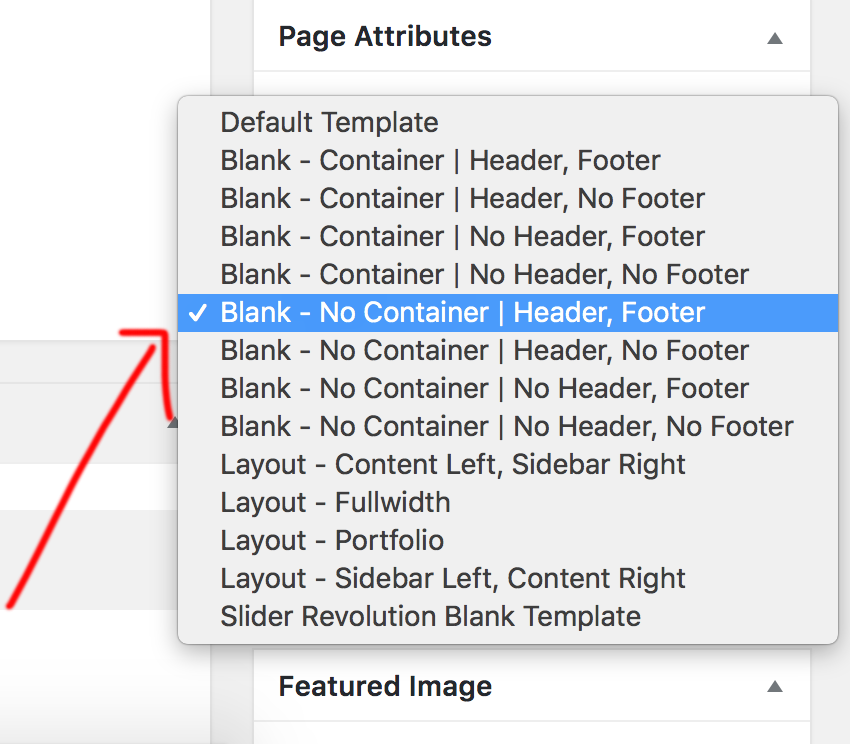
If again it changes to default template automatically let us know your website details so that we can have a look.
Before sending us the details please follow few troubleshooting processes.

  1. Clear all caches including browser cache then deactivate your caching plugins and other optimization plugins.

  2. If you’re using a CDN, please clear the CDN’s cache and disable optimization services.

  3. Test for a plugin conflict. You can do this by deactivating all third party plugins, and seeing if the problem remains. If it’s fixed, you’ll know a plugin caused the problem, and you can narrow down which one by reactivating them one at a time.

  4. Remove custom CSS, Javascript and templates.

  5. Reset your htaccess file by renaming it to .htaccess-bak. Then in WP Admin Menu, go to Settings > Permalinks and just click the Save Changes button.

In case the issue persists, would you mind providing us with login credentials so we can take a closer look? Please provide following information:
Set it as Secure Note

  • Link to your site
  • WordPress Admin username / password
    All the best!

Yeah, I went looking for that.

I don’t have that dropdown on any of my page’s attributes section. It’s disappeared.

Hi There,

That is strange! Please delete your theme files via FTP and re in stall it.
Also please deactivate all third-party plugins except cornerstone.
Let us know if that helps!

Thanks

Got it. Looks like my Sass pre-processor had switched to outputting a compact style.css which deleted the comments at the beginning of the file. That broke the child theme’s reference to the parent theme, and caused all the weirdness.

Luckily there was an error on the Appearance>Theme’s which gave me the needed clue.

Thanks for your help!

You are most welcome!

This topic was automatically closed 10 days after the last reply. New replies are no longer allowed.