I tried to set the color to rgba(0,0,0,1) with !important but it’s stuck in all header and footer menus at rgba(0,0,0,0.5).
Hi Sinan,
Thanks for writing in! Upon checking your referenced site, I see that you don’t have any WordPress site installed on your domain (see secure note).
If you’re re-installing your site, let us know once you finish setting up your site.
Thanks!
The problem is that the placeholder links were directing to the current page, so they were highlighted. The site does have WP, but a team member took it down without issuing me notice. Thanks for your time!
Edit: I have another problem now. My header is suddenly not sticky. It does shrink when I enable shrinking and scroll down, but it still remains at its static spot instead of sticking to the viewport’s edge. I tried disabling all plugins except for the two that came with the install, but that didn’t work.
Hi Sinan,
About the first issue, are you referring to hover effect? The menu has solid opacity now ( 1 ), if you’re referring to hover effect then please change it through this
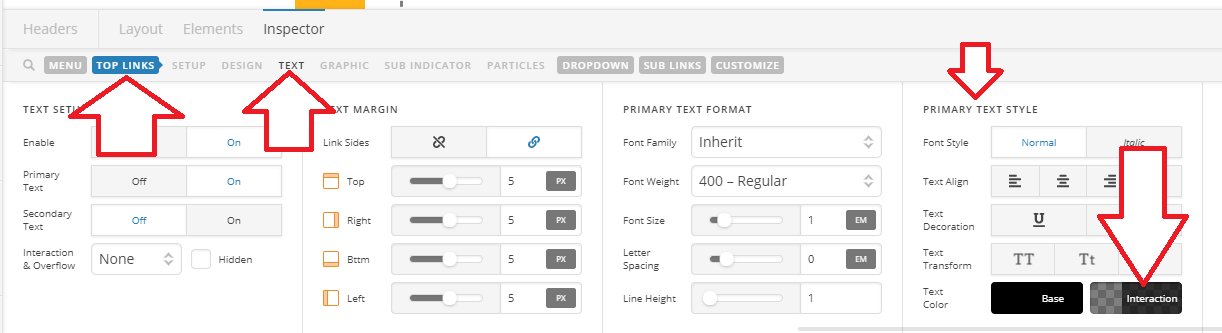
As you can see in the screenshot, and if you click it, it’s still set to rgba(0, 0, 0, 0.5).
As for sticky problem, it’s because of this custom CSS
$el {
  position: relative;
}
added here
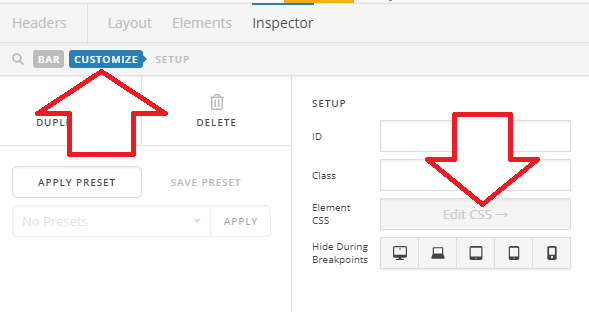
Please inspect your header bar and remove it.
Thanks!
Facepalm I’m sorry I forgot I had set custom CSS for that one. Thanks a lot!
You’re welcome!
This topic was automatically closed 10 days after the last reply. New replies are no longer allowed.