Hello, I’m using Email Forms and the text above the input fields is white for some reason. How do I change this?

Hey @HannaHa,
The Email Form label gets its color from its parent element so for example, if you’re using or added the Email Form shortcode in a Text element and you set the Text element’s color to green, the label will be green.

If you placed the Email Form shortcode in a Content Area element, since the Content Area doesn’t have an option to change the text color, the label will get the color from the Body and Content color option in Theme Options.
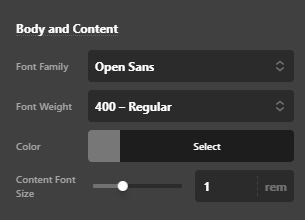
With that said, you will want to check the text color of where you inserted the Email Form shortcode.
It’s also possible that you set the color through custom CSS. Please check your custom CSS. To quickly test this, temporarily remove all custom codes in Theme Options > CSS.
Hope that helps.
This topic was automatically closed 10 days after the last reply. New replies are no longer allowed.