Hi,
On www.vitstix.com there is a bar of white space at the top of the menu. How do we remove this?
Thanks
Hi,
On www.vitstix.com there is a bar of white space at the top of the menu. How do we remove this?
Thanks
Hi There @tomandersondixon
Thanks for writing in! Upon inspecting your site’s HTML, I see a <br> tag below the body tag which adding this extra white space. I’m not sure exactly, from where it is coming from. So use the following troubleshooting methods to identify it.

If you’re using a caching plugin, make sure to purge server cache and also clear browser cache before testing your changes.
Hope that helps.
Thanks,
I have a Pro Header. On the same header I have a section visible on computers but not mobile and vice versa. It appears that it’s this hidden section. e.g. the Mobile “Header” when on the computer. How do I stop this?
Thanks,
Tom
Hello Tom,
Thanks for updating the thread.
I am not quite sure about the reply you have posted. I checked the website and it does not seems to be a case due to Pro Theme header builder. The space is coming regardless of the screen size or device. I checked the website on my mobile and can see the space because of
tag. Looks like a issue coming because of some script or 3rd party plugin.
That being said, can you please elaborate It appears that it's this hidden section. e.g. the Mobile "Header" when on the computer. .
Thanks.
Hi,
Please see the image attached when viewing on incognito.
Please take a look.
Hi Tom,
The white space on the site seems to be caused by a random <br> tag added on the top of the page.
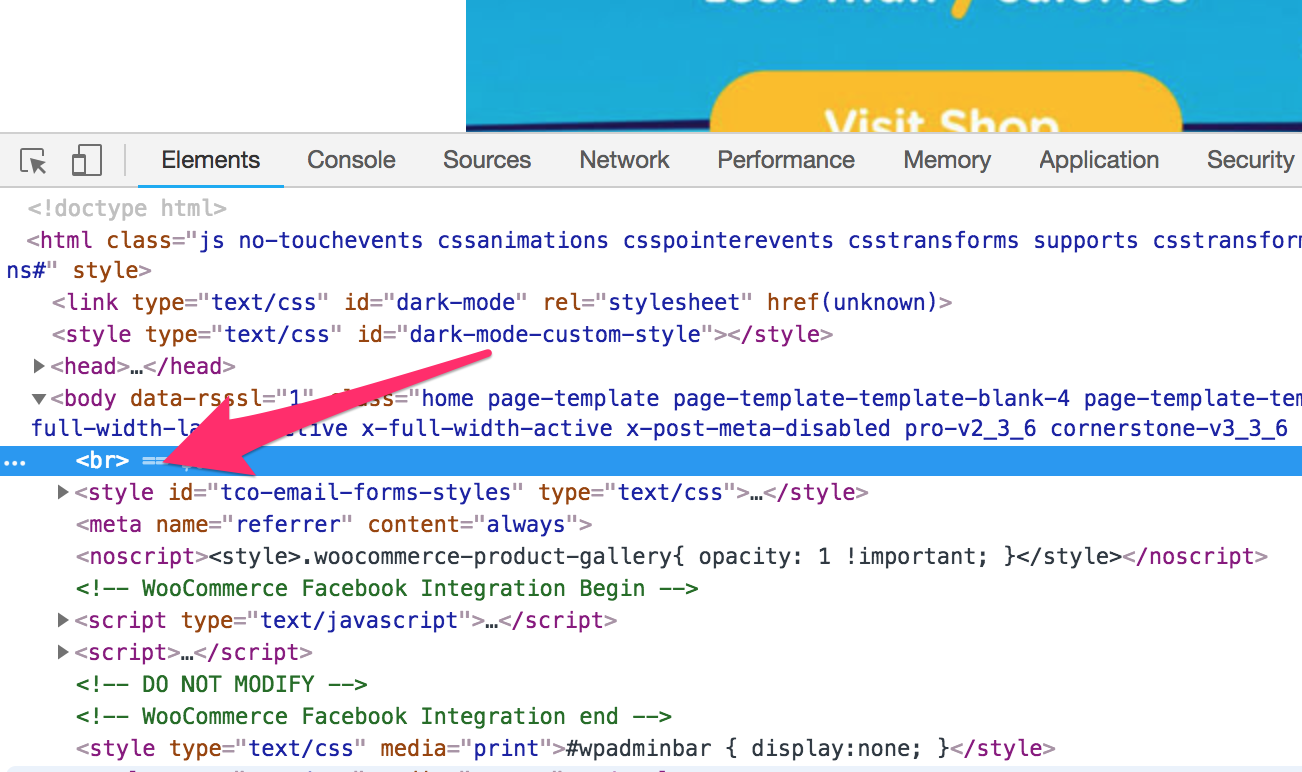
It could be caused by a plugin or script. Please try testing for a plugin conflict. You can do this by deactivating all third party plugins, and seeing if the problem remains. If it’s fixed, you’ll know a plugin caused the problem, and you can narrow down which one by reactivating them one at a time.
Let us know how it goes!
This topic was automatically closed 10 days after the last reply. New replies are no longer allowed.