I have some text animations on my site http://emotionaldetoxprogram.com which I cannot figure out where to disable. I have looked everywhere. Can you point me to where this is set?
Hi There,
If you are talking about the text animation on the top of the page, that is related to layer slider.
To disable it you have to edit your layer slider. You can go through this documentation to see how to work with layer slider.
Regarding the font animation the body part of the page, you have to disable the column animation in the cornerstone editor.
Please select the column and disable the fade effect in the cornerstone panel.
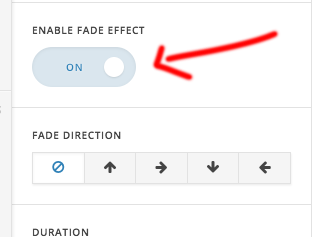
Hope this helps!
No, I am talking about the body text where the text slides into view.
Hi there,
For the body animation, you can follow the step I have mentioned above.
If you are using a version 2 element the layout is little different. Please check this screenshot.
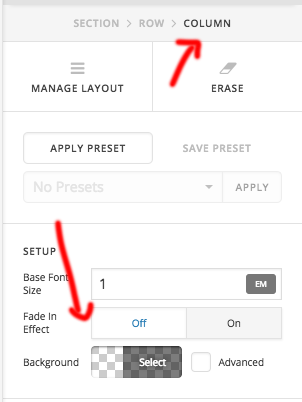
Thanks
I just can’t seem to find where to select the column.
Actually, just found it. Thanks!
you are most welcome!
This topic was automatically closed 10 days after the last reply. New replies are no longer allowed.