Where to place grid element?

Hi,

Love the intro videos to the grid, however, none of them show where/how to place the grid. Do I make a new section and then place a grid element within a column in a row? Should I choose the one-column layout for the row setting if so?

Thanks,
Dave
Hello Dave,

Thanks for writing to us.

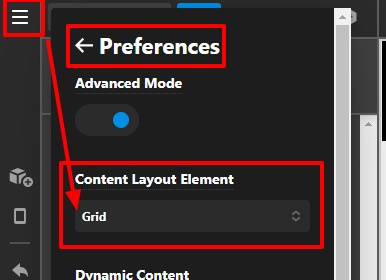
You can use use the Grid element in any column, it depends upon your design. Or you need to go to your page click on the Hamburger Icon —Preferences --> Content Layout Element—>Select —>Grid

SERVICES-Content-Pro (1)

It would give you an option to add grid element in default when you add any section to your page
Please have a look at the given screenshot given below.

Thanks

Hi,

Thanks! So if I choose the Grid layout instead of the Row element can I mix and match rows and grids on the same page simply by toggling back and forth on the Content Layout Element from Grid to Row?

~Dave

Yes, you can also hold ctrl/cmd when clicking the + icon on a Section in the Outline view to get a list of compatible elements inline.

Sweet, thanks!

Hi David,

You’re welcome and it’s our pleasure to help you. If you have any other concerns regarding our theme features, feel free to reach us.

Thank you.

This topic was automatically closed 10 days after the last reply. New replies are no longer allowed.