Hi,
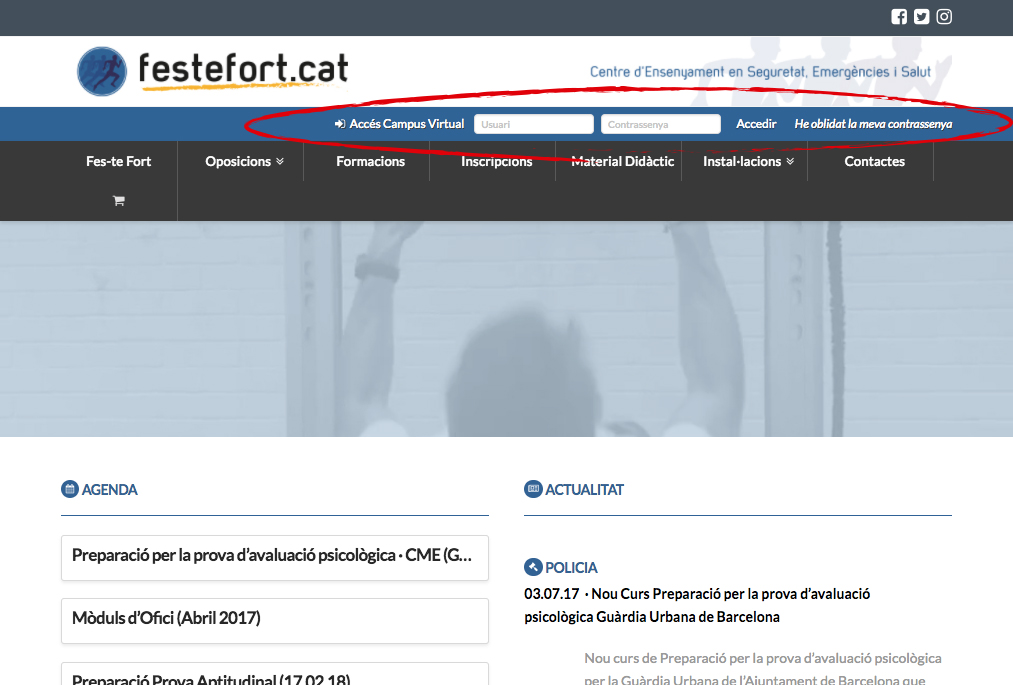
I can’t upgrade my theme because I lost a very important thing from my site.
When I updated to the last version, I disappeared some fields that I put manually modifying the file_navbar.php of the folders //wp-content /themes /x /framework /views /global/
When I wanted to recreate the line, I did not find this file.
Could you tell me where I should put these lines?
It seems that the theme has completely changed its structure.
I put here a part of the code of the current file:
Summary
// =============================================================================
// VIEWS/GLOBAL/_NAVBAR.PHP
// -----------------------------------------------------------------------------
// Outputs the navbar.
// =============================================================================
$navbar_position = x_get_navbar_positioning();
$logo_nav_layout = x_get_logo_navigation_layout();
$is_one_page_nav = x_is_one_page_navigation();
?>
<?php if ( ( $navbar_position == 'static-top' || $navbar_position == 'fixed-top' || $is_one_page_nav ) && $logo_nav_layout == 'stacked' ) : ?>
<div class="x-logobar">
<div class="x-logobar-inner">
<div class="x-container max width">
<?php x_get_view( 'global', '_brand' ); ?>
</div>
</div>
</div>
<div id='menu2header'>
<div class="x-container max width">
<form method='POST' action="http://www.festefort.activemoodle.com/login/index.php">
<i class="x-icon x-icon-sign-in" data-x-icon=""></i> Accés Campus Virtual <input id="campFormulari2"type=text name="username" placeholder="Usuari"> <input id="campFormulari" type=password name="password" placeholder="Contrassenya">
<INPUT type="SUBMIT" value="Accedir" class="accesmoodle"><a href="http://www.festefort.activemoodle.com/login/forgot_password.php" style="color: rgb(255,255,255)"><em> He oblidat la meva contrassenya</em></a>
</form>
</div>
</div>
<div class="x-navbar-wrap">
<div class="<?php x_navbar_class(); ?>">
<div class="x-navbar-inner">
<div class="x-container max width">
<?php x_get_view( 'global', '_nav', 'primary' ); ?>
</div>
</div>
</div>
</div>
Thank you very much!