Wasn’t there an option to do that?? What happened to it?
And the colors I’m choosing for my text aren’t reflected. I wish you guys could put this important stuff in the changelog.
Wasn’t there an option to do that?? What happened to it?
And the colors I’m choosing for my text aren’t reflected. I wish you guys could put this important stuff in the changelog.
Hi there,
We add the REM unit whenever it is possible in different options of the Header in Pro. For example, you can find the REM unit in the font size of the Inline Navigation:
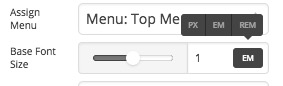
Not all the options there has the REM unit. For more information regarding that unit kindly read this article:
Regarding the colors of the text, you will need to give us more detailed information so that we can investigate the case.
Also kindly make sure that you have a backup of your website and update the theme to version 1.2.0.
Thank you.
WHERE DO I SET THE BASE REM SIZE???
just tell me where
Hi There,
Not all element offers the Base Font Size option, but If it does you can see it on the Setup tab (the very first tab). There you can choose to have the REM unit.

As we know REM (root em) units referenced from the root font size. You can configure Root Font Size under Theme Options > Typography.
Hope it helps,
Cheers!