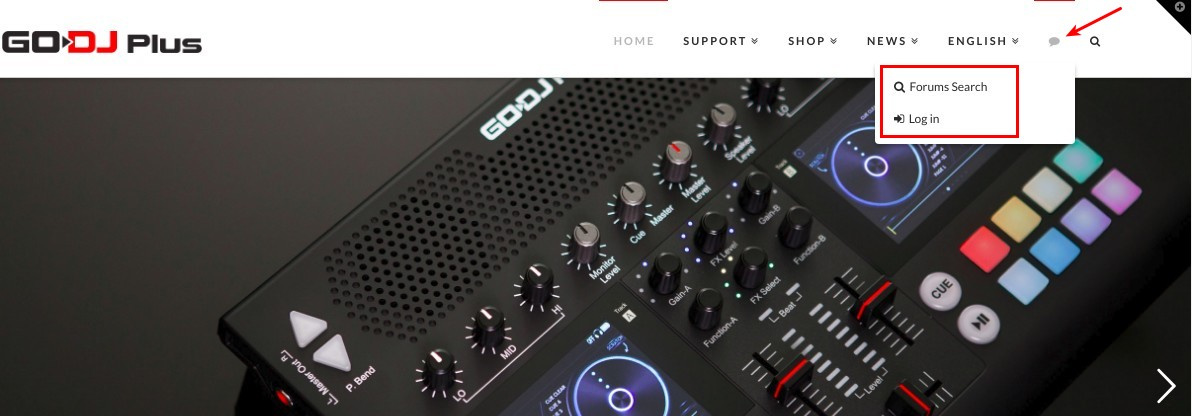
Where can I edit this?

First, Please understand that the language is not smooth because you are using a translator.

I’m editing “integrity 1”. I do not know where to fix the part of the picture.
picture link

I do not know the name of this and can not search.

I would like to edit this to add login / logout and woocommerce cart functionality.

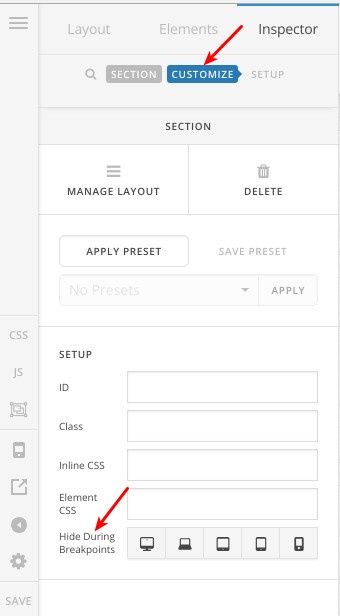
and, “HIDE BASED ON SCREEN WIDTH” of corner stone appears only in “classic element”. Why?
classic
normal

using the X theme.
Hi,

In non-classic elements (V2 elements), this option is moved to “Customize” tab, please check this screenshot:

This menu item:

Is related to bbPress plugin, adding login/register links there should be doable following this guide:
https://codex.bbpress.org/step-by-step-guide-to-setting-up-a-bbpress-forum/#10-adding-forum-menu-items

Adding “Cart” menu item would be related to WooCommerce plugin, I can see you are running X theme with Integrity Stack, so you can enable this cart menu item from (X > Theme Options > WooCommerce > NAVBAR MENU).

Thanks.

This topic was automatically closed 10 days after the last reply. New replies are no longer allowed.