Weird spacing above footer

My site is: http://dev2.verdenergia.org/

For some reason, I randomly got a white space between my two footers (one of which is a global block). This isn’t an issue on my other pages, just the home page. Why is this happening?

Can you please fix this?

Hi @Web_Services,

I checked your site and there is a top and bottom padding in the section that is causing the whitespace:

Try setting the section’s padding to 0.

Hope this helps.

So that’s what I had thought as well. But, I just checked the padding for the section and it is set to 0, which is why I’m confused.

Could you please make the change for me so that the white space disappears?

Thank you!

Hello @Web_Services,

Thanks for updating the thread. :slight_smile:

I checked the website and opened the page in Cornerstone. I can see the padding is set to zero. I then inspected the front end of the website in dev tools and it looks like a broken HTML problem as when I checked the website in dev tools I noticed that the section that’s holding Global Block element is also having nested sections. Now, ideally a section can have rows and columns not nested sections. Please see screenshot.
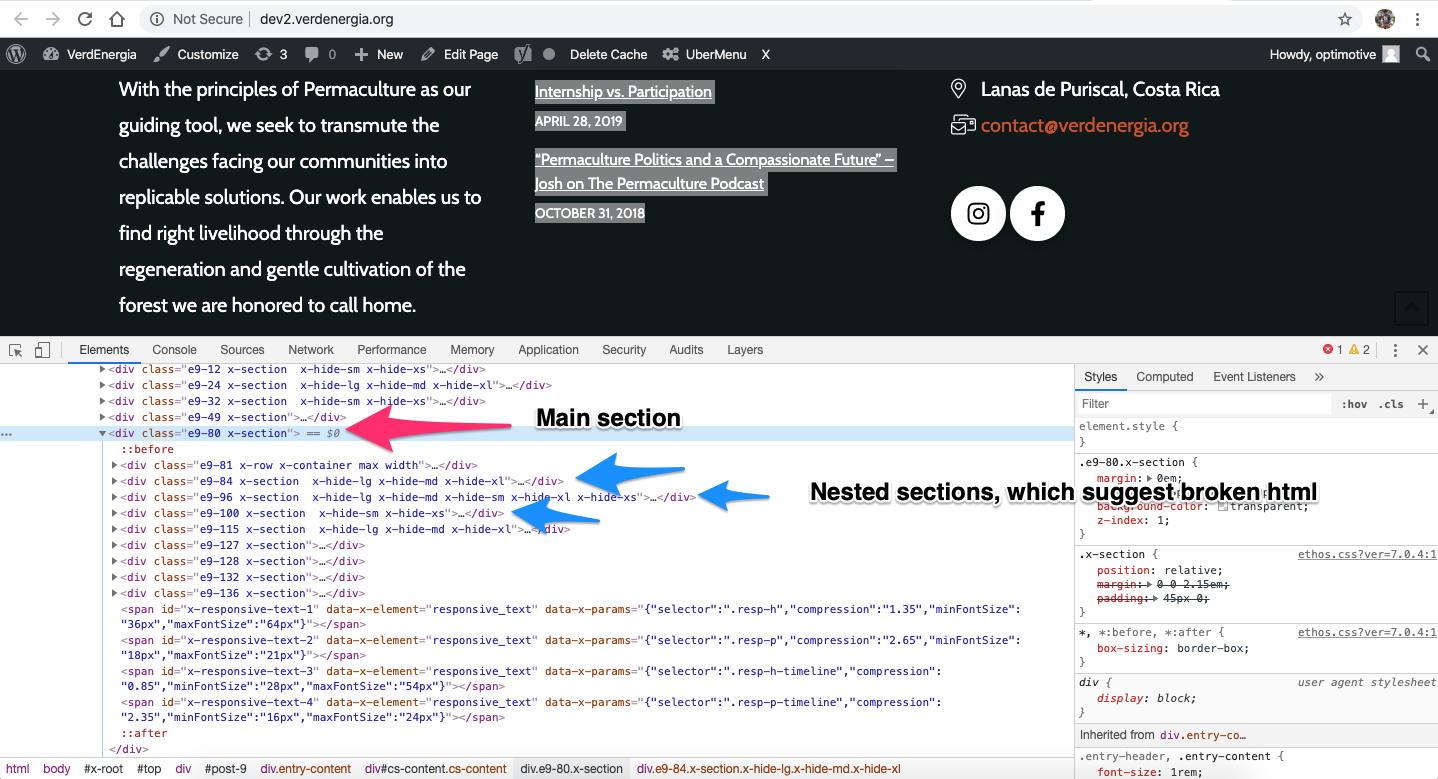
In that regards, I suggest you to inspect the page in Cornerstone and if you have added custom HTML then please make sure that you have properly closed the HTML tag and that’s tag are not missing.

Let us know how it goes.

Thanks.

So, the issue is that I have not added any custom HTML. This page just randomly became like this. I’m not familiar with HTML. Could you please make the change for me to fix the issue if you know how?

Hello @Web_Services,

I was able to resolve your issue, It is coming from the top and bottom padding of Section 6.

Please check your homepage now.

Perfect, thank you so much!

You are most welcome. :slight_smile:

This topic was automatically closed 10 days after the last reply. New replies are no longer allowed.