Thank you for replying @christian
I have checked the Child Theme. Apart from some code to insert a template block at every posting, there are no CSS changes in Child Theme. I also checked CSS/JS Customization. It has plenty of CSS customizations but the only one that involves body tag is the one you highlighted. Finally, I also tried disabling most of the plugins without breaking the site but to no avail.
Truth be told, I added the CSS for body tag. If I use the default
body { overflow-x:hidden; }
Then the desktop shows 2 vertical scroll bars as shown below.
That is why I configured it to unset !important.
So I am trying a workaround…
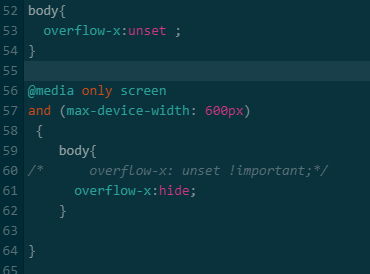
It seems to work except there are actually 2 vertical scrolls on mobile view… barely visible but you cannot scroll down with the mouse on a desktop simulating a mobile view. On a phone, you have to scroll twice to get to the inner vertical scroll.
I do not want to waste your time on an issue that doesn’t concern the theme but I do not know where to turn. This current situation is not ideal but the problem is hidden.
Hope you can help.




