Website in different languages

Hi, I need to make a customer website bilingual.
Visitor should be able to choose language somewhere in the header.

Could you recommend a plug in, which works fine with X pro?

I don´t need a plug in that translate the content (will add it manually), but all the other things (urls etc.) should work fine.
Guess WMPL is a good one, but does it work with pro?

Thanks
Andre
Hi Andre,

WMPL is not yet fully compatible with PRO our Developers are working on it and it should be very soon.

if you don´t mind having the Wordpress automatic generated parts like: “last comments” in English, you could actually use just PRO as it allows you to assign different headers to different pages, so you could have a Spanish header with option to turn to English, which would lead you to a different page with the English header.

Hope that makese sense.

Thank you

Hi, thank you for your answer. Have to think about.
Prefer a good workin plug-in but will see.
I testet Polylang meanwhile, and it seems to work good for my needs.
Any experience with this plug-in? Pro´s / contra´s ?

Thx
Andre

Hi Andre,

To tell you the truth I am not 100% aware of the compatibility of the plugin with the newer versions of our products.

It used to work just fine, but I also recall someone commenting about some issues on our Facebook Group.

It is generally a really good plugin, not as good as WPML but good.

I would recommend you consulting our Facebook group X Theme Pro Users to get a feedback of potential issues with other users before you put too much energy on it. Make sure to let us know which product you are using

Hope it helps

Hey Joao, come back to this thread.
Meanwhile I find your first proposal very interessting and stranded at the same idea.
Just to be sure that I get right.
So I don´t need automatical translation. I have the translation for all my pages.
So I set a header and add a an icon for example to change the language.
I link the icon to the startpage in the other language (and of course I activate the second navigation only for these related pages).
To make it easy I can copy all my pages, change the name and url, and the content, set the two menues (two languages), and two footers.

Is that the way you recommended?

Thx
Andre

Hi André,

Yes that would work.

A few things you need to have in mind, for example, your blog page. Your blog page I would suggest you building using The Grid plugins and create your posts with your categories.

Let´s say: Spanish, Portuguese, English

So you can select your posts from which language.

The only things that would not be translated would be the automatic Wordpress generated parts, like “read more” for example…

It really depends on how strict you or your clients are, I personally would prefer to work this way to avoid translation plugins.

Hope it helps

Ok, thanks a lot. At the moment the “news” section is not planed in a second language. That makes it easier.

Best
Andre

You’re welcome, Andre.

Hi, so did what we talked about. Could you pls check sub.protecmobil.com.
I have to flags beside the logo, which looks good at monitorsize 1920x1080px,
but if I go down to 1280x800 for example the two flag-icons are stick togehter.
You can see it also here: https://www.magentacloud.de/lnk/oEEuHsLt

So I can´t find the right setting to avoid that. Wanna have them always in same position and with the same gab from icon to icon, indepentend of the screen size, until the mobilemode is activated.

Thx for help
Andre

Hey Andre,

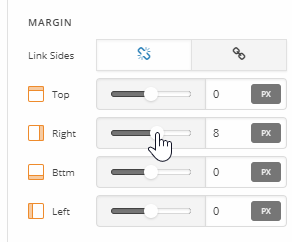
Please add some right margin to your image icons. See https://youtu.be/sHy_F8dPacA

If you have further questions that are not related to translation, I kindly request for you to open a separate thread for each topic in order to avoid confusion.

Thanks.

Thank you
Andre

You’re welcome.