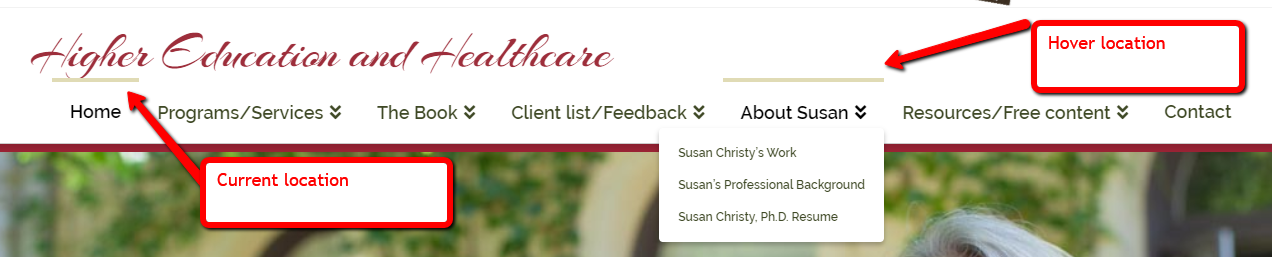
Want to remove bar above menu items and current menu selection

I have installed version 5.4.8.3 of the Slider Revolution that came with the X theme - I am currently using the X - Child Theme. The current theme installed is 6.5.6 (though I didn’t think I installed this version - I think it updated on its own. I use the Cornerstone editor.

There is a bar that shows up above a menu when I hover over it and a bar that stays above the current menu that I am visiting.

I want to remove them completely.

I have left my login information in a secure note.

I have found similar topics but for different themes. I’ve tried adding some global css that worked for other themes, but those didn’t work.

Hello Susan,

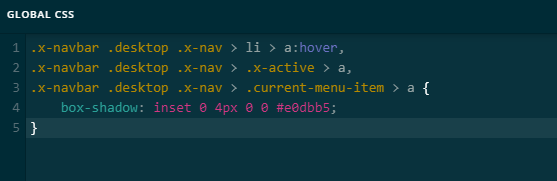
That is actually the default hover state of the menu items in X. To get rid of it, please add this code in X > Theme Options > CSS:

.x-navbar .desktop .x-nav > li > a:hover, 
.x-navbar .desktop .x-nav > .x-active > a, 
.x-navbar .desktop .x-nav > .current-menu-item > a {
    box-shadow: inset 0 4px 0 0 #e0dbb5;
}

Hope this helps.

Sadly, this didn’t work.

Please help.

Susan

Hello Susan,

Thanks for updating the thread. :slight_smile:

Please use following CSS under X > Theme Options > CSS:

.x-navbar .desktop .x-nav > li > a:hover, .x-navbar .desktop .x-nav > .x-active > a, .x-navbar .desktop .x-nav > .current-menu-item > a {box-shadow: none !important;}

1- I have found the proper CSS code selector using the Chrome browser Developer Toolbar: https://www.youtube.com/watch?v=wcFnnxfA70g

2- For the CSS code itself, I suggest that you get started with this tutorial: https://www.youtube.com/watch?v=yfoY53QXEnI

Thanks.

1 Like

@Prasant, can I just say…THANK YOU!!! I’ve been after this one for about a week and a half now. That totally and completely worked without modification. Also, thank you for the 2 YouTube references. I will definitely check them out. A little guidance always pays off in the future.

We are delighted to assist you with this.

Cheers!

This topic was automatically closed 10 days after the last reply. New replies are no longer allowed.