Hi there,
We have a video poster image that is 2000px wide and crisp, however when placed as the video poster image, it becomes very, very blurry. I’ve troubleshooted with no solutions. Would you be able to take a look?
Hi there,
We have a video poster image that is 2000px wide and crisp, however when placed as the video poster image, it becomes very, very blurry. I’ve troubleshooted with no solutions. Would you be able to take a look?
Hi Heather,
Thank you for reaching out to us. I checked your image settings and it was not set to Full size but Medium - 300 x 169 was selected (see screenshot below). I went ahead and changed the size to Full by re-selecting the Poster image and this fixed the issue.
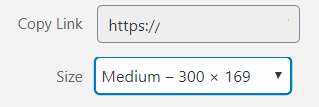
Don’t forget to clear all caches including your browser’s cache to see the changes on the front-end. Cheers!
Oh wow! So I can know for next time, would you be able to share where that is located? I’ve looked at the screenshot though can’t seem to figure out where that setting would be located. Thank you!
Hey Heather,
Those settings can be found in the Media Library, when you click on the Poster image to upload, this will take you to the Media Library and inside Media Library when you select an image to be used as a Poster, you’ll find settings in the right panel:
Now scroll down a bit and you’ll see the Size dropdown:
Hope this helps!
Thank you for your kindness! 
Glad we could help.
Cheers!
This topic was automatically closed 10 days after the last reply. New replies are no longer allowed.
