How can I get the Essential Grid extension’s navigation arrows to appear vertically centered to the photo stream?
They appear toward the top of my photos for some reason:
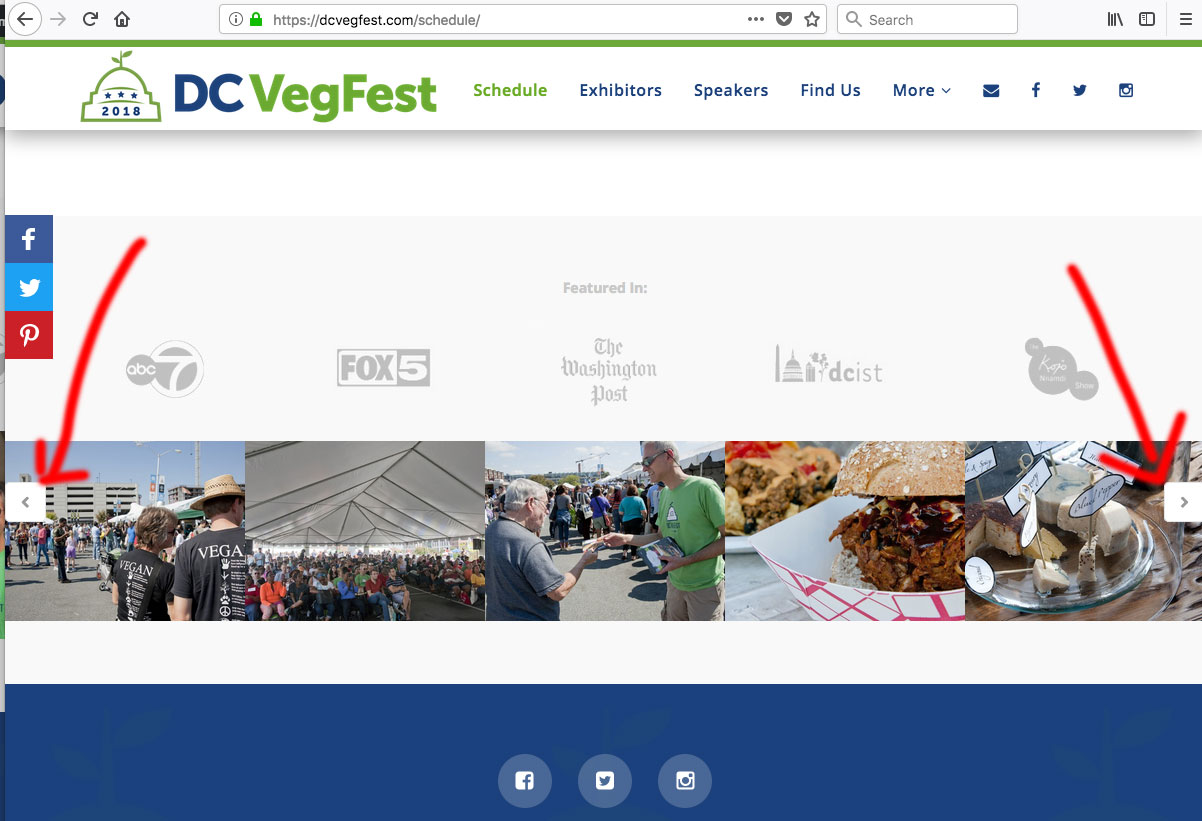
Site: https://tinyurl.com/y8y7eoq3
Thanks
How can I get the Essential Grid extension’s navigation arrows to appear vertically centered to the photo stream?
They appear toward the top of my photos for some reason:
Site: https://tinyurl.com/y8y7eoq3
Thanks
Hi,
To fix it, you can add this in Theme Options > CSS
.minimal-light .esg-left,
.minimal-light .esg-right {
    margin-top: 20px !important;
}
Hope that helps.
Thanks. Works okay on desktop, low on mobile (the arrows were actually already centered on mobile, so now they’re lower). Not sure why all breakpoints wouldn’t have the same alignment.
HI There,
Please delete the previous CSS and add this custom CSS instead:
.esg-filters.esg-singlefilters.esg-navbutton-solo-left,
.esg-filters.esg-singlefilters.esg-navbutton-solo-right {
    top: auto !important;
    bottom: 25% !important;
}

@media (max-width: 979px){
   .esg-filters.esg-singlefilters.esg-navbutton-solo-left,
    .esg-filters.esg-singlefilters.esg-navbutton-solo-right {
        bottom: 35% !important;
    }
}

@media (max-width: 767px){
   .esg-filters.esg-singlefilters.esg-navbutton-solo-left,
    .esg-filters.esg-singlefilters.esg-navbutton-solo-right {
        bottom: 40% !important;
    }
}
Hope it helps 
It’s not 100% there, but it’s better than it was! Thank you.
You’re more than welcome, glad we could help.
Cheers!
This topic was automatically closed 10 days after the last reply. New replies are no longer allowed.