Vertical-align not working. I added this but not working. I don’t know why.
$el {
vertical-align: bottom !important;
}
The picture hand (column right) on the download the app is not aligned to the bottom. Happens when reducing the size wide

Vertical-align not working. I added this but not working. I don’t know why.
$el {
vertical-align: bottom !important;
}
The picture hand (column right) on the download the app is not aligned to the bottom. Happens when reducing the size wide
Hi Iban,
I have just checked the page that you have linked and the image seems to be aligned correctly to the edge of the column:

Please try to clear your cache.
Thank you.
The issue happens when you resize the page to narrower. Then the image looks like it is floating
But it should be always at the bottom. Thanks!
Hello @Iban,
Thanks for posting in!
The vertical align will only work if the containers were set as tables. Please edit the page and in the row settings, enable the “Marginless Column” option.
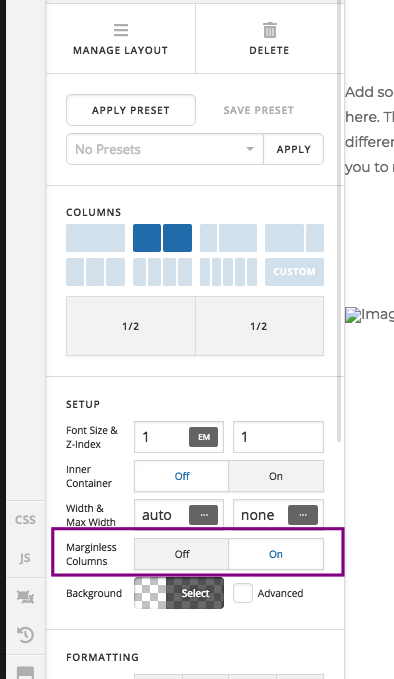
We would loved to know if this has work for you. Thank you.
Hi!
Yes, it worked
Thank you!!
You’re welcome!
We’re glad we were able to help you out.
Great tip! Just used and help a long proble I had to sort this kind of things out!
Glad it’s working on your end. There is no vertical alignment feature by default on columns since they aren’t meant to be a table layout. But since margin-less is a table layout then the styling will work. Thanks!
This topic was automatically closed 10 days after the last reply. New replies are no longer allowed.