Hello, see secure note for login information.
I have created a simplified test-playground that replicates the problem. I have used the native Cornerstone “Terms (Column)” Element, changed it to have a 3-column layout, and moved the Looper Provider from the Column to the Row:

The “Title” (Headline element) contains content that may help to trouble shoot the problem, namely the {{looper.index}} dynamic content, a Twig IF statement that returns either “even” or “odd”, and the {{dc:term:name}} from the original “Terms (Column)” setup:
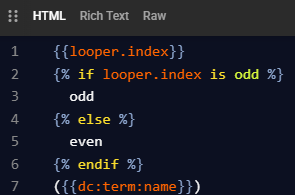
This works all perfectly fine, this is how the output looks:
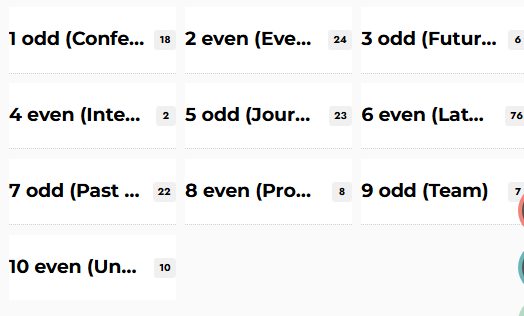 .
.
Now to the problem: I have added CSS to the Column (“List Item”) to set the background color of the list item to either orange or green, depending on the the looper.index, replicating the working Twig IF statement in the HTML:
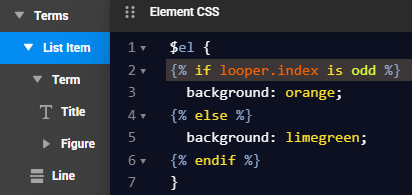
Odd items should have an orange background, even items should have a green background. However, all items have the same background, as if the TWIG statement inside the CSS is run only once during the looping, and is then fixed.
Strangely enough, all backgrounds are green (= even), even though one would think that it should be orange (=odd) if it is evaluated during the first run.
When I move the element CSS from the “List Item” (Column) element (which carries the consumer) to the “Term” element (a Div inside the consumer), I still get all backgrounds to be the same color, but now it is orange.
Consistent with this behavior, some more testing revealed the following: I have changed the If condition to {% if looper.index == n %}
CSS on “Term” (inside the looper consumer):
With n=1, where the if statement evaluates “true” (=orange) for the first loop, ALL elements become orange
With n= anything else, where the if statement evaluates “false” (=green) on the first loop, ALL elements become green
CSS on “List Item” (element having the looper consumer):
With n=0, the if statement apparently evaluates “true” for the first loop, and ALL elements become orange
With n= anything else: if statement apparently evaluates “false” on the first loop, and ALL elements become green
So, taken together, I believe that this is a bug where the element CSS is not honoring the fact that it may change during a loop, but is evaluated once only.
This is not a general CSS-with-Twig-statement problem. As I final test, I went back to the HTML, and I have changed the first line in the HTML {{looper.index}} to inject some inline CSS, including a TWIG If statement, to turn the background either white or red, depending on whether it is odd or even. This works!
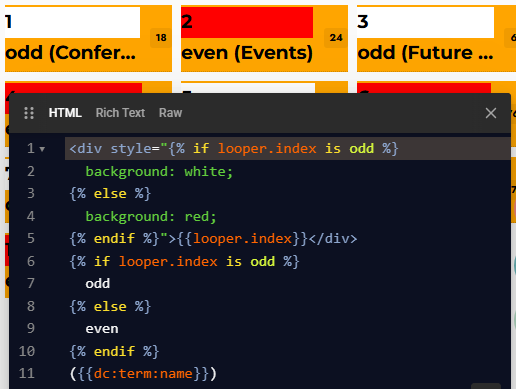

 .
.
