Using parameter values to activate toggle functions on elements

Hi!
I was wondering what the status is of this request:

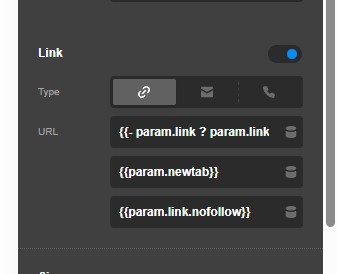
Currently I’m working on a custom heading element based on the default cornerstone element to limit options for clients and set it up more as a single source solution. The heading needs a URL option, which currently leaves the Link checkbox always on in the source heading element. This means all our headings are inside an A tag, even when there is no link present on the element.

I read that it was on the list for the 6.7 release, so are there any updates on this? I would love to toggle functionalities on or off inside elements with parameters and use the default elements rather than building it up from scratch.

Thanks! :smiley:

Edit:
The A tag generation can be fixed with whitespace checking using twig, but toggling seems like a cleaner solution:
{{- param.link ? param.link.linkType ~ param.link.link -}}

Hey @100leiden,

Thanks for posting in! I would love to check your component setup. You can provide us with your WP details and add them in the secure note in your next reply with the following info:
– Link to your site
– WP login URL
– WP username
– WP password
– WP Administrator Role
– Confirmation that we can access and make changes to your site

To know how to create a secure note, please check this out: How The Forum Works

image

By the way, @Charlie already implemented the request. Make sure you are using the latest version.

Best Regards.

Hi!
We’re running version 6.7.12
Here you can see the toggle:
Screenshot 2026-02-02 101945

We support toggle controls on singular line items, but not on a group like in your screenshot. We have to discuss internally how that’s going to work as the UI is much different then a normal control line. Have a great day.

1 Like

Thanks for the info!

Cheers!

You’re welcome.

This topic was automatically closed 10 days after the last reply. New replies are no longer allowed.