Hello,
Is it possible to use, for example, Google Lobster font, in a Text Element?
If so, how can i make this?
I’ve allready installed TypeKit and add the Lobster font to it.
Thanks in advance,
NunoHello,
Is it possible to use, for example, Google Lobster font, in a Text Element?
If so, how can i make this?
I’ve allready installed TypeKit and add the Lobster font to it.
Thanks in advance,
NunoHey Nuno,
The Typekit extension does not connect to the Font Manager. Please deactivate it and go to Pro > Fonts.
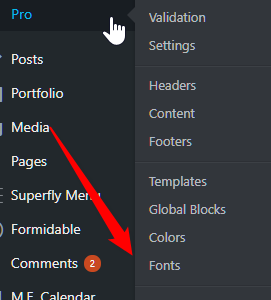
Then, in the bottom left corner, click on the gears icon and then you’ll see the Typekit tab where you can setup your kit.

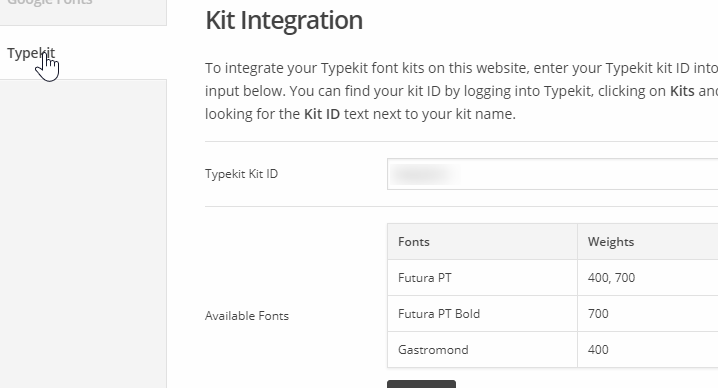
Once integrated, your fonts will be available for selection in the Font Manager.
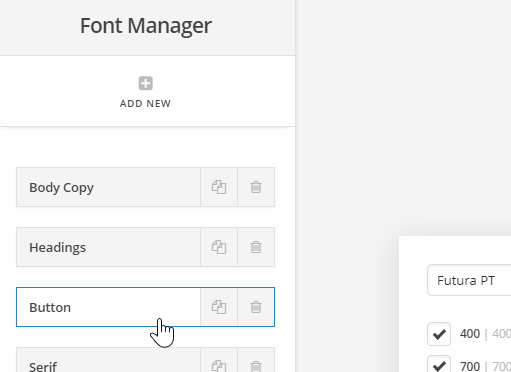
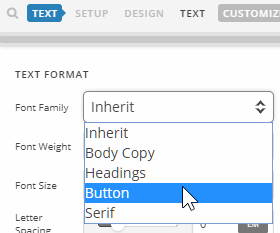
Fonts in the Font Manager is then available in the text option in elements with texts.
Hope that helps.
Hello Christian!
Thank you for your reply.
I deactivate the Typekit Plugin, but i don’t have the option Fonts in my Pro (still in Pro 1).
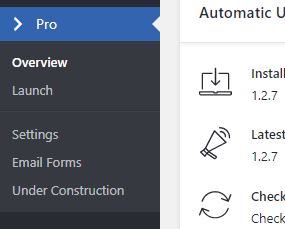
Am i missing something?
Thanks,
NunoHi there,
The menu in question is in the latest version of the Pro which is now on manual upgrade channel and you can download it by going to your Themeco Dashboard and install it manually.
For your version you simply need to go to Pro > Launch > Templates > Fonts and you will see the same Typekit icon in the left section of the screen.
Thank you.
Thank you Christopher!
You’re welcome, Nuno.
This topic was automatically closed 10 days after the last reply. New replies are no longer allowed.