Use of different google font for "Top Menu Bar" and "Container 2 Text on "background photo bar"

Hey Support,

we are having some trouble specifying font face “Carrois Gothic SC” https://fonts.google.com/specimen/Carrois+Gothic+SC
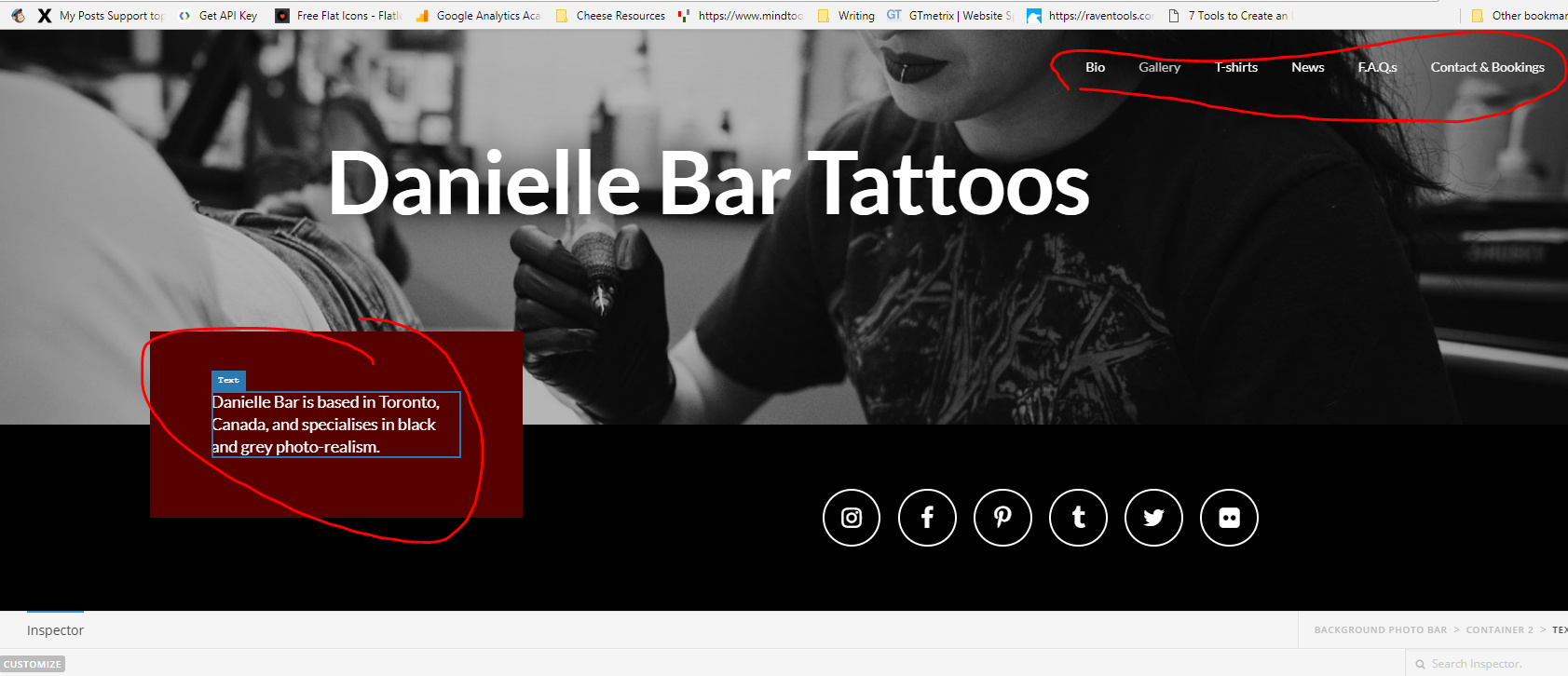
We tried to use some css customisation on the header launcher but we were unable to see the expected result.

Let us know what you think we can do to ensure that the ONLY THE MENU and the TEXT FIELD in the HEADER as shown in the screen shot are using “Carrois Gothic SC” In text font options we can’t seem to see a way to include the “Carrois Gothic SC” font for the menu or the text field.

Thanks for any help you can provide us!

all the best.

ENB…// - (on behalf on Danielle Bar)

Hi There,

Thanks for writing in! To assist you with this issue, we’ll first need you to provide us with your URL. This is to ensure that we can provide you with a tailored answer to your situation. Once you have provided us with your URL, we will be happy to assist you with everything.

Thank you.

Hi Jade,

https://dbartattoos.ca

Hello There,

Thanks for providing the url of your site. Before you can use a Google font, you will need to import it first. Please have your updated and make use of this code:

@import url('https://fonts.googleapis.com/css?family=Carrois+Gothic+SC');

.x-anchor-text-primary, 
.x-anchor-text-secondary,
.hm9.x-text {
    font-family: 'Carrois Gothic SC', sans-serif !important;
}

Hope this helps. Please let us know how it goes.