where is the favicon Area to upload the image I looked everywhere an you show me a screenshot please
Im using Pro and custom header
where is the favicon Area to upload the image I looked everywhere an you show me a screenshot please
Im using Pro and custom header
Hi @rotation,
Thank you for reaching out to us. “Site Icon” settings can now be found under Appearance > Customize > Site Identity. As of Pro 2.1.0 we have migrated to native WordPress “Site Icon” for cleaner brand management and since Wordpress has native feature for favicons.
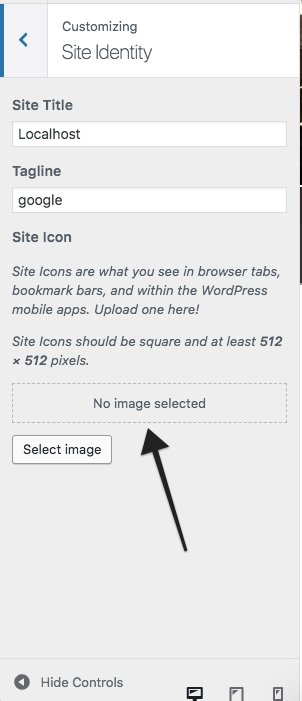
Hope this helps!
This topic was automatically closed 10 days after the last reply. New replies are no longer allowed.