Unwanted space above row/column

In order to get a fully flexible background feature image, I’ve used Essential Grid (as recommended in another thread).

I’ve made a test page with just the single image essential grid to check the link I applied which works. However, there is a space above the element that I can’t work out how to remove. I’ve already made the section, row, column with 0 padding and margin but it’s still there.

This is the page - https://karaboclothing.co.uk/test-grid/

Can you help?
Hello Loren,

Thanks for writing in!

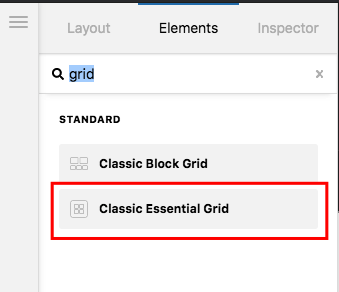
The spaces were generated from the empty <p> tags because you use a content area element and inserted the essential grid shortcode. I would highly recommend that you use the Classic Essential Grid Element instead. Please remove the content area element and do not use shortcodes.

By using the Classic Essential Grid element, even if you do not have a preview, you can always make sure that there will be NO EMPTY spaces when you view the page in live view.

Hope this makes sense.

Awesome! Thank you!

You’re welcome Loren!

Cheers.

This topic was automatically closed 10 days after the last reply. New replies are no longer allowed.