Unable to delete block

So I’m in the process of creating a new website, but am unable to delete this black block in the body section:

I am not sure what’s causing it and have tried everything I can think of to get rid of it. It’s not an element, it’s not part of the background image, and I can’t select it. I’m not sure if I screwed something up in the settings or what. Has anyone else experienced this before? How can I get rid of it?
Hi there,

I checked the pages on your site here: http://u0r.c9f.myftpupload.com/home-5/

But I don’t see the page that has the black box.

Would you mind providing the direct link to the page so that we can check it?

Thank you.

Thank you for your reply! So I made a few changes and now the staging site looks like this: http://u0r.c9f.myftpupload.com/

As you can see, I haven’t uploaded any content to this page yet, but I would really like to make the page translucent, so that you can see the background image behind the content. Is there any way I can do that? Also, do you know why the newsletter sign up form in the footer isn’t being constrained to the content width?

Thank you.

Hi again,

To make your site translucent, please try adding the following code in the Theme Options > CSS:

.entry-wrap {
    background-color: transparent;
}
.x-boxed-layout-active .site, .x-boxed-layout-active .x-site {
    background-color: rgba(0,0,0,0.5);
}

For the newsletter form, I see a table is being rendered and the space you’ve is not enough for your tabular form, to fix it you can add the following code as well:

.mc4wp-form-fields table, .mc4wp-form-fields tbody, .mc4wp-form-fields tr {
  display: block;
}
.mc4wp-form-fields td {
  display: inline-block;
}

Hope this helps!

1 Like

Thank you! That worked! I’m so sorry, but I have another question for you. Now my site looks like this: http://u0r.c9f.myftpupload.com/x/#/options. So surrounding the content section where it has our welcome message, there’s a border and the page title (HOME) visible. How can I remove these, so that only the content section is visible?

Hi @adrock5150

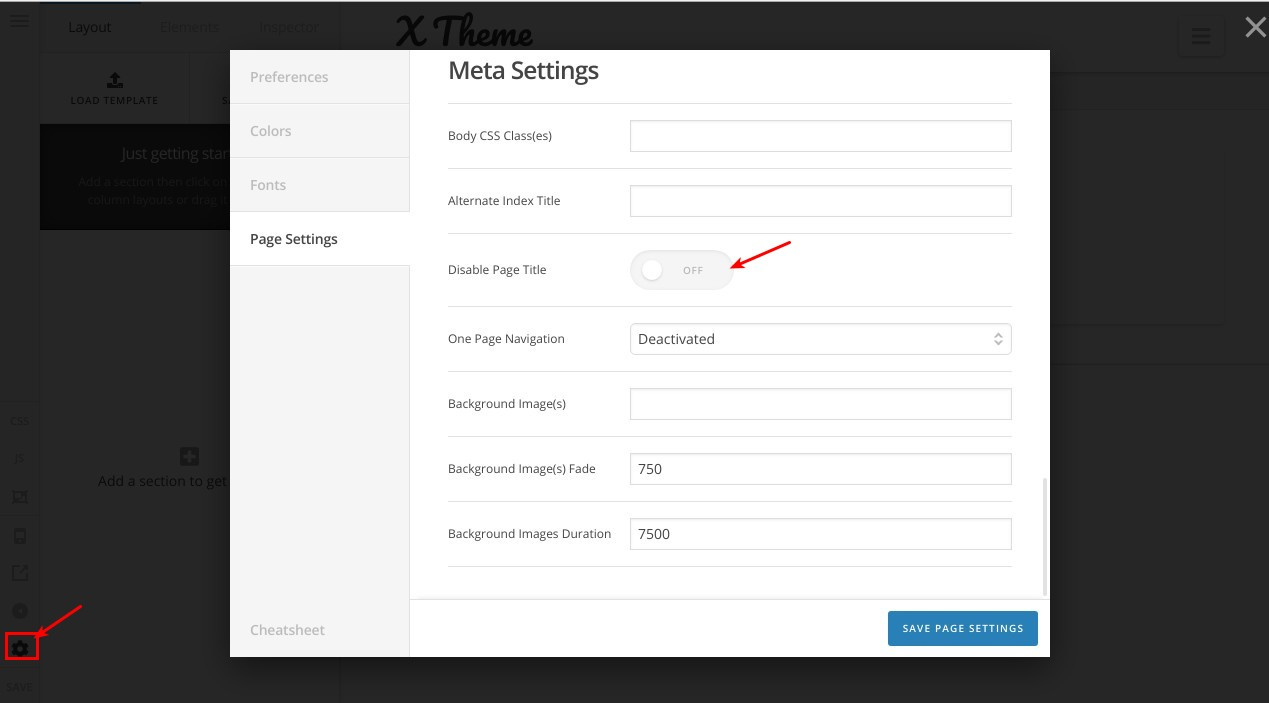
You can edit this page using Cornerstone and disable the title option as in this screenshot:

Thanks.

1 Like

Hi there,

It seems that you have deleted your previous post.

Please let us know if you have further questions.

Cheers!

This topic was automatically closed 10 days after the last reply. New replies are no longer allowed.