Hi
Back in May I added a section to the homepage of our website, containing 3 columns (using Cornerstone with X-Theme).
Each column had a different background image, using the ‘background lower layer’ option, with text/heading/button elements placed on top – see image 1 (below):
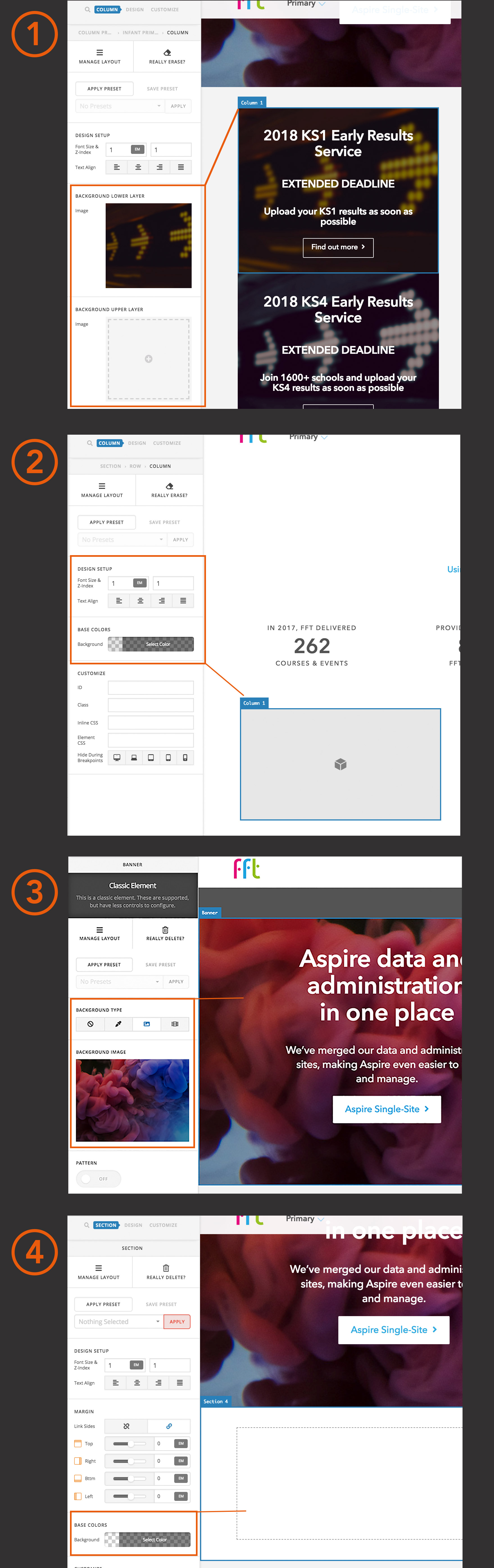
A week ago, I tired to recreate this on another page, and found that there was no way of adding background images to columns anymore – you can only select a base colour (see image 2, above).
The same has also happened with adding background images to new sections, which is integral to our website design. Image 3 (above) shows the ‘background type’ options that used to be available, and image 4 (above) shows these options have now been removed and only a base colour can be selected.
You can also see that in image 3 that the section is listed as a classic element, whereas in image 4 the new section isn’t, even though both sections were created in the exact same way. I don’t know whether this is part of the problem.
I’ve checked for updates, and we are on both the latest versions of Cornerstone (3.2.5) and X-Theme (6.2.5).
Please advise, many thanks.
