Ubermenu testing before using as primary menu?

I would like to upgrade my site’s menu to a new ubermenu. But I wish to design it prior to it getting assigned as the public-facing menu. Unfortunately, as soon as I activate the plugin, the new Ubermenu version (currently ugly) automatically displays.

Is there a way to revert back to the original non-ubermenu menu, while still having the Ubermenu plugin active? My goal is to create a new ubermenu, assign it to a less prominent page on the site for design and testing, and only replace the current primary menu with the newly designed Ubermenu, once I’m happy. Is this possible?

(If it matters to your solution, the current primary menu was designed before upgrading to Pro. I am now designing my first Header in Pro, which will get assigned once the Ubermenu is ready as well.)

Hi @capodanno,

Thanks for reaching out.

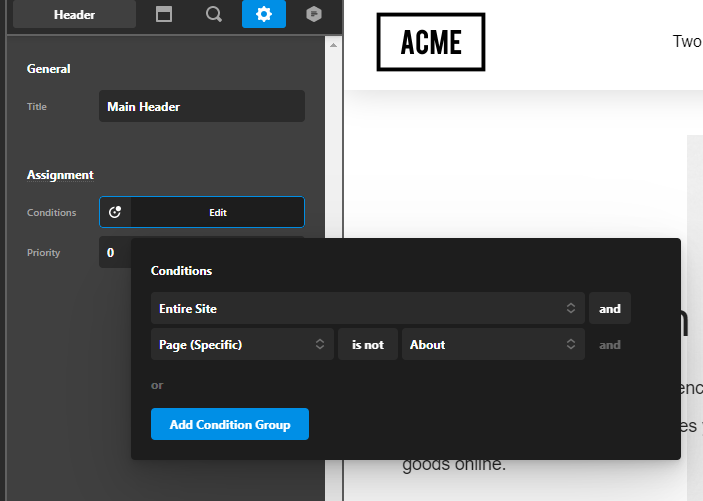
The ubermenu will automatically override your default header menus if you don’t use the header builder when creating your header. I suggest that you will create your current menu using the header builder so you can set a condition where one of your test page will not show the header menu, in that way you can style your ubermenu. See the example below.

I created a header using the header builder then I set that header not to show on my about page:

Then on the about page, the header menu is showing the ubermenu.

General Menu:

Hope that helps.

Thank you.

That’s a good suggestion, thank you!

Hello @capodanno,

Glad that we were able to help you. Please feel free to reach us if you have any query regarding our theme and theme settings.

Thanks

This topic was automatically closed 10 days after the last reply. New replies are no longer allowed.
