UberMenu 3 & Image Map Pro CS conflict?

I currently have the latest versions of UberMenu 3 (v3.4.0.1) and Image Map Pro for Cornerstone (v4.4.0) installed on a site with up-to-date versions of WP, X and Cornerstone. A few weeks ago I updated to the latest version of UberMenu it broke my Image Map Pro map I created. Well, it didn’t break it but it did change to appearance of the map markers on the map. Is this a known issue between the 2 plugins and does anyone know how to fix it? I have also opened a support ticket with developer of Image Map Pro for CS. When I disable UberMenu, the map markers look correct, when I disable it, they look incorrect. This is a client site and they like the look of the UberMenu AND the Image Map Pro for CS map, so I need both to work. TIA!

Here is a link to the way the map markers look incorrectly on the production site (see the orange, red and blue map markers on the bottom of the Contact page):

Link to development server is in secure note. There it displays as it should (UberMenu 3 is disabled).
Hi There,

Thanks for writing in! Could you please try disabling your Uber menu’s Google map API and see if that helps. It should be under general settings (Load Google Maps API).

Hope that helps.

Google Map API is already disabled and there is no Google API key in the UberMenu settings. This is because I am using Google maps also and they are working fine. Anything other ideas?

Hi techKNOW

I would appreciate if you can double check the login credentials for me as it seems it doesn’t work.

Thanks.

See secure note…

Hi,

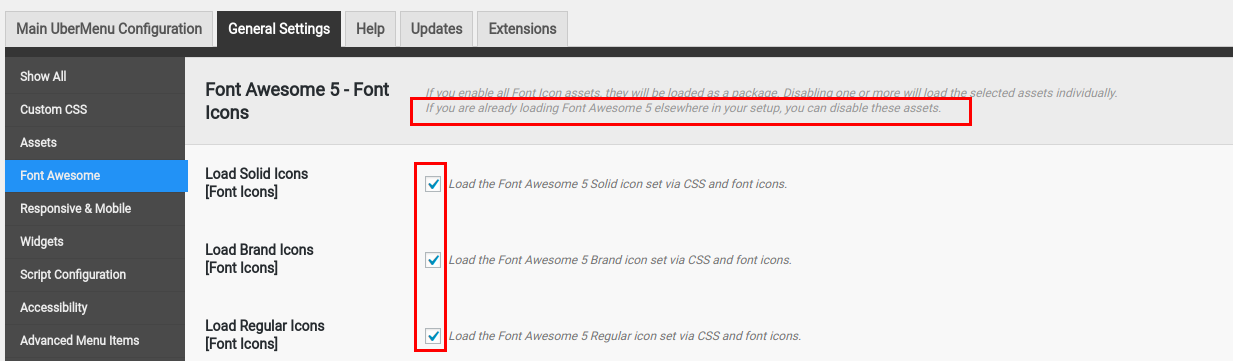
It’s a font conflict issue, both are using Font Awesome, you can try disabling loading Font Awesome in (UberMenu > General Settings > Font Awesome) this worked for me on the dev server but intermittently, it could be due to cache.

However, I’m sure that adding this CSS snippet to (X > Theme Options > CSS) will fix this issue:

.imp-shape-container .fa-map-marker:before {
    font-family: FontAwesome;
}

Please give it a try and let me know how it goes,
Thanks.

The CSS snippet seemed to fix it!

For future reference where do you turn off Font Awesome in UberMenu? I went to (UberMenu > General Settings > Font Awesome) as you described but all the settings were the same between the development and prod server. I did not see a place to disable Font Awesome in that location. Just various settings, mostly regarding v4 and v5 Font Awesome compatibility. Is it a single checkbox? If so can you pls give me the exact name of that checkbox? Thanks!

Hi techKNOW,

I’m glad to hear that it worked! the check boxes I mean are right there:

Thanks.

This topic was automatically closed 10 days after the last reply. New replies are no longer allowed.