Uber Menu spacing issues

Hello,

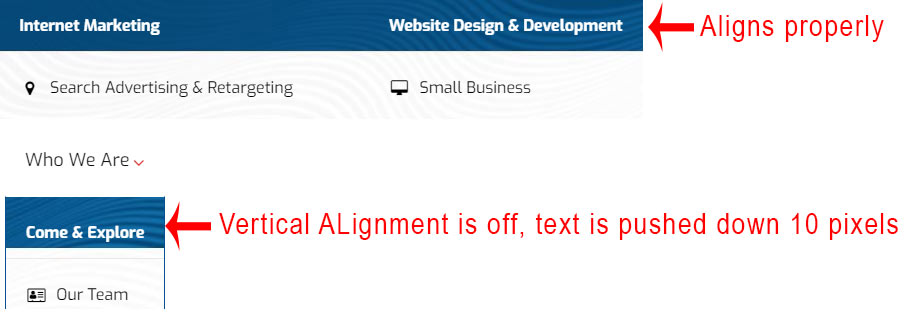
I setup my ubermenu about a month ago and everything has been perfect. Today I added made another menu item a dropdown and the styling does not match. The menu item text is being pushed down 10px.

I did some styling work on my menu Search dropdown and it also has the same spacing issue.

I compared every piece of setup to the “What We Do” dropdown which is working perfectly and cannot find anything that s configured differently. I looked for over 2 hours!

Please help me to to the bottom of this.

Thanks

Micah
Hi there,

Thanks for writing in.

It’s because of Ubermenu auto column and it adds 10px padding on top. Please try adding this CSS to your global custom CSS.

.ubermenu .ubermenu-autocolumn, .ubermenu .ubermenu-submenu-type-stack {
    padding-top: 10px !important;
}

It’s from Ubermenu CSS files itself, the only way to override is CSS as well.

Thanks!

Thanks for the help. I had to change it to 0px but it did fix the problem.

.ubermenu .ubermenu-autocolumn, .ubermenu .ubermenu-submenu-type-stack {
padding-top: 0px !important;
}

Micah

Glad to hear that :slight_smile:

This topic was automatically closed 10 days after the last reply. New replies are no longer allowed.