Uber menu - absolute/relative positioning

Hi there,

This relates to http://fossil.badwolfproductions.co.uk/

On the home page you can see that my Ubermenu is absolute, taking up the default padding added in to the beginning of every new section added to a page - the menu can be seen being located tight to the first heading, ‘Collections’.

I had previously added in a Slider Revolution element, set to full screen, but this was going off screen, clearly being pushed down by the ubermenu.

I cannot find a setting to change this to relative, such as in your own Pro header builder. I also haven’t had this issue with Superfly before either. Do you have a solution to this?

Thanks
Mark
Hi Mark,
To get some space around the first section I suggest adding this CSS code to (Pro > Theme Options > CSS):

.x-main.full {
    margin-top: 50px;
}

Thanks.

Hi Alaa,

Thanks, this did push the content down, however my slider still suffers the same issue.

See the home page, http://fossil.badwolfproductions.co.uk/ , it still requires somewhat of a scroll down to see the bottom. How do I get this to fit within a single view and not extend beyond the ‘above the fold’ ?

Thanks
Mark

Hello there,

You need to lessen the height of your hero image to the same size of the hero image of your About page.

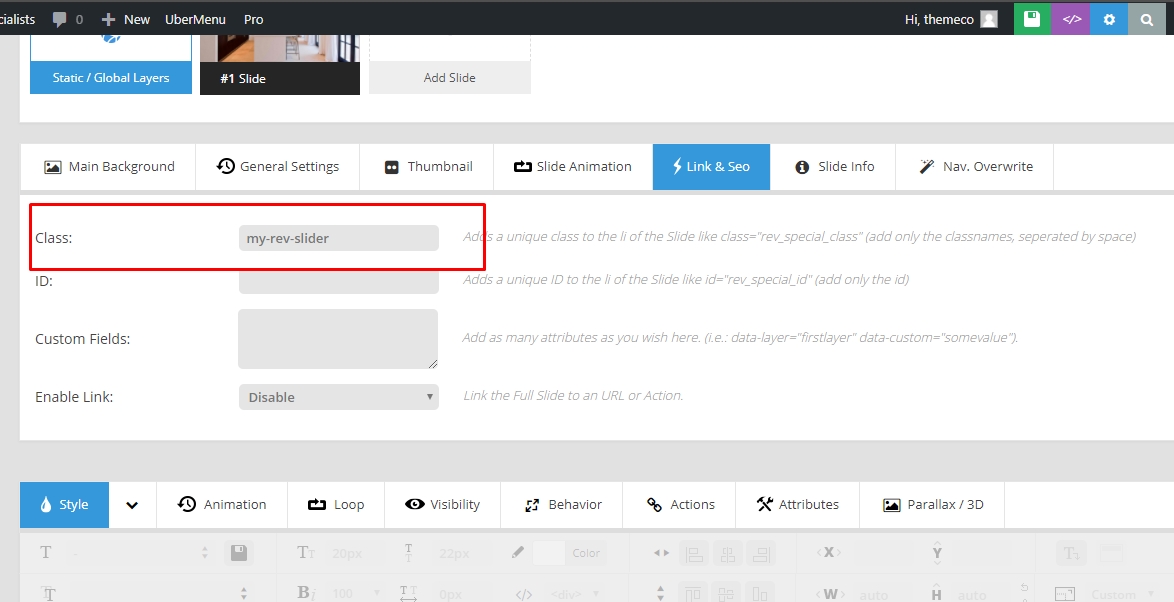
To achieve this, edit your slider and add a class named.my-rev-slider on the Link & SEO tab.

Then add this code into Pro > Theme Options > CSS:

#rev_slider_1_1_forcefullwidth,
.my-rev-slider {
    height: 450px !important;
}
.my-rev-slider .tp-parallax-wrap {
    top: 225px !important;
} 

Hope that helps.

Hi Jumar,

Sorry this isn’t what I’m after. What I want is for the same thing as on this site - https://www.badwolfproductions.co.uk/

Notice how the video slider here is full height, even if you resize the window, the video never goes above, or lower than, the bottom of the window. That is how I want this to be as well.

The code you gave lessened the height too far.

I hope that makes sense.

Thanks
Mark

Hey Mark,

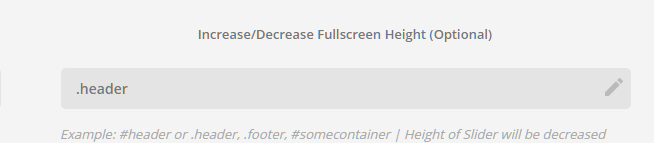
The class you’re using in Increase/Decrease Fullscreen Height is incorrect.

It must be set to .masthead. It’s fixed now. See https://youtu.be/N6aalORuRtU

Please note that this does not take into account the admin bar.

Hope that helps

This topic was automatically closed 10 days after the last reply. New replies are no longer allowed.