Typekit fonts not showing up in customiser typography section

Hi,
I’m having a problem with Typekit. I have the plugin activated and I have my kit code installed and the Typekit font is showing. However, when I go to the Customiser the font isn’t showing in the list. You can see that in this image:
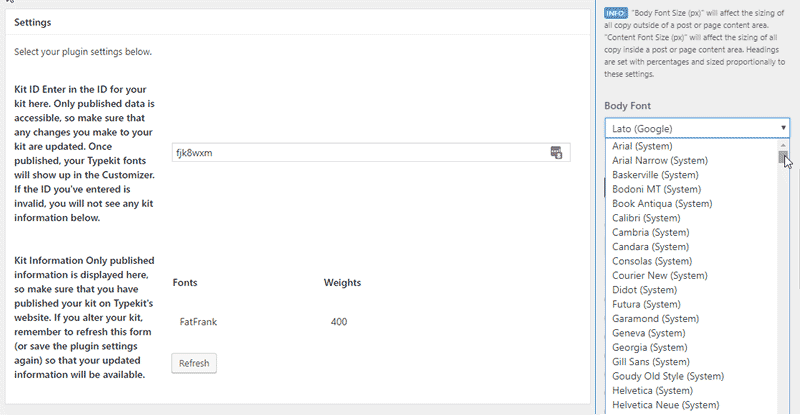
The strange thing is that the font was there a few days ago, as I was able to use it in the header builder. Now, there is no sign of it.

ADDITIONAL:

I have just found out I can still specify the Typekit font if I go into Customiser > Custom > Edit Global CSS.

I was able to use the TypeKit font FatFrank on buttons using this CSS:

.x-btn {
font-family: FatFrank;
}

Still not showing in the font dropdown list though.

Cheers,
Col

I HAVE THE SAME ISSUE AND IT IS BEYOND FRUSTRATING SOS PLEASE HELP

Sorry for the all caps but for real, I can’t figure out how to fix this.

1 Like

Hello There,

Thanks for writing in! To assist you better with this issue, would you mind providing us the url of your site with login credentials so we can take a closer look? This is to ensure that we can provide you with a tailored answer to your situation. Once you have provided us with your URL, we will be happy to assist you with everything.

To do this, you can create a secure note with the following info:
– Link to your site
– WordPress Admin username / password

@ShotSkydiver:
At this time we kindly ask that you open up your issue in a separate thread. The longer threads get in the forum, they become more difficult to support as they tend to drift off topic and they also make it troublesome for users trying to search for solutions. Keeping threads relevant to their original inquiry ensures that we can keep better track of what has been resolved and that users can more effectively find answers to similar issues they might be experiencing.
​
Thank you.

I’m having the same issue.

Hello @pbujok,

Thanks for updating this thread. Could you please open your issue in a separate thread to avoid from getting off topic. Meawhile, please make sure that your theme is up to date. X 5.1.1 and Cornerstone 2.0.6 is now available in automatic updates. Please check the changelog here: https://theme.co/changelog/

Thank you for your understanding.

Hi,
I’ve placed a secure note with my login details.

Cheers.

@pixelscol, @ShotSkydiver, @pbujok,

I confirm that using the Typekit extension, the Typekit fonts does not show in Customize > Typography and also Theme Options > Typography. Using the extension will load the Typekit font though. That is why it will work if you use CSS.

The best solution is to load the Typekit font in the Font Manager and use the Theme Options > Typography route rather than the Customizer. You can delete the Typekit extension if you’ll use the Font Manager.

I’m not sure if this is a bug or intentional. I’ll report this to our development team.

@ShotSkydiver and @pbujok, if the issue persists using the Font Manger route, please open your own thread as the cause of the issue might be different from the original poster @pixelscol. Also, if in case we need to ask for credentials, the original poster could see all private posts so it’s best to open your own thread.

Thanks.

2 Likes

Thanks Xian.

I’ll check out that way of doing things :slight_smile:

Cheers.

You’re welcome.