The site I am working on has a typed text in the header. When the text is typed out, it pushes the existing text to the next line. This causes the size of the header to change in a jerky distracting way. Is there a way to adjust it so that the text does not move to the next line, or the header does not change size?
Hey @EpiphanyHealth,
That’s because the text is contained. With the current size of your text, it is not possible to make the text stay in one line. It’s spatially impossible. If you wish to make the text remain in one line, you will need to reduce the font size or increase the container size. To increase the container size, go to Theme Options > Layout and Design and increase the Site Max Width.

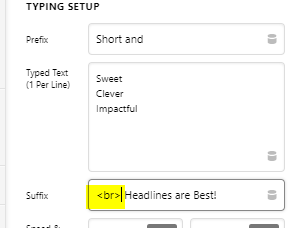
If it’s ok that the text span 2 lines permanently, you can add <br> to the Suffix like the screenshot below. This is the most simplest solution.
Hope that helps.
This topic was automatically closed 10 days after the last reply. New replies are no longer allowed.