Two images in box full image

Hi,

I am ne too this and i have searsched the forum and i have not been successfull in finding the solution as you can probably see from the title of this qeustion i am probably searching wrong!

Here goes, I have a column with an image on one side and text on the other but the image is in a child image and so is the text, i would like for the image to cover the whole box as well as the text in the other box, i have provided screenshots on what i am wanting to do and would appreciate the help. Thank you!

Hello @jeffrey_hodson123,

Thanks for writing to us.

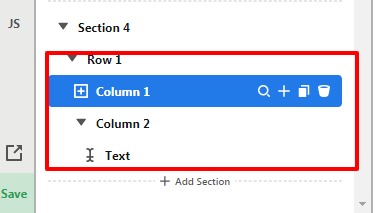
You can divide the row into two-column. Please have a look at the given screenshot below.
ABOUT-Content-Prosc

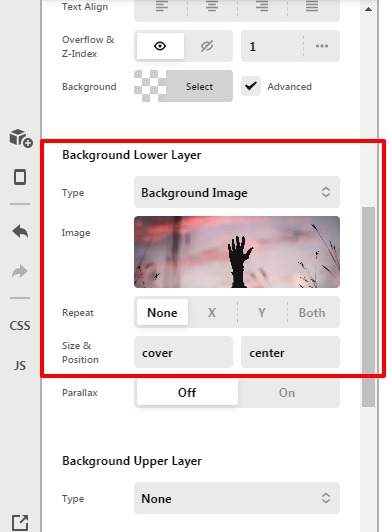
Now you can set the background image in one column. You should set the background-size as “cover” Please have a look at the given screenshot below.

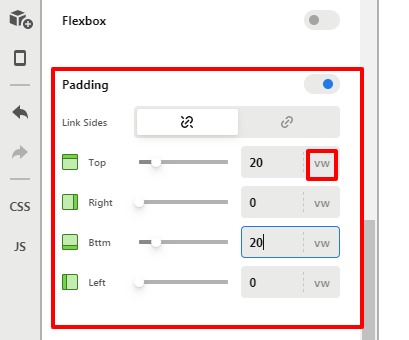
Now you need to set the column padding top and bottom in the VW unit so that background image covers the content height.
ABOUT-Content-Pro

After that, you can add text in the 2nd column.

Hope it helps
Thanks

Thank you for your prompt reply, it was not exactly what i was looking to do but after doing what you said in the instructions you sent i decided to stick with the setup i currently have! Thank you very much!

You are most welcome.

This topic was automatically closed 10 days after the last reply. New replies are no longer allowed.