Tweaking Body Class for Custom Template

I have created a custom template for pages. I am basically just duplicating (template-layout-full-width.php) I have duplicated it in my child theme with a new filename and the corresponding file in the framework/views folder.

When I create my page I can choose the template in the dropdown and it is active on the front end. So far so good.

I am trying to keep as much of the default Pro code as possible so with the x_main_content_class(); function it is adding x-main left to the main div and the body class ofx-content-sidebar-active.

However, I need it to actually be full width with the class x-main full and have the body class of x-full-width-active. Is there a way to define this somewhere, instead of just hardcoding the class to the div and not use x_main_content_class(); as well as define the full width class in the body?
Hi @designerken,

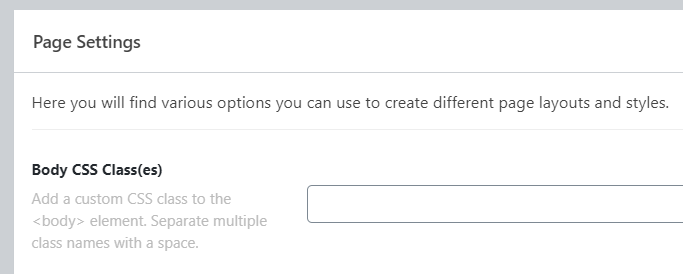
Thank you for reaching out to us. When you create a page with your custom template. you can add Body Class(es) under Page Settings in WP page editor:

image

Since you need this page template to be full width so you can remove x_main_content_class(); and hard code the classes x-main full this should not create any problem.

Hope this helps!

currently I added the x_get_content_layout() function (FUNCTIONS/GLOBAL/CONTENT.PHP) to the functions.php file and added the check for the additional page_template. This solved both the body and the main div classes.

Yes the simple way was to just manually add the x-main full class and call it a day. I probably will revert to this as it is easier to maintain long term.

Hi @designerken,

We’re glad that you’re able to solve your issue. If you have any other concerns, feel free to reach us.

Thank you.

This topic was automatically closed 10 days after the last reply. New replies are no longer allowed.