Trying to get image to overlap header bar, but not menu

Hey guys,

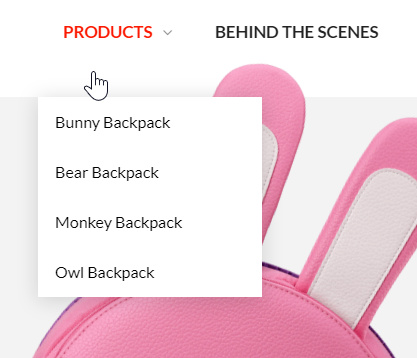
I’m trying to create a unique 3D experience on my product page by making the main product image overlap the header. I was able to easily achieve the look I wanted using Z-index, but I just realized that the overlap is not allowing users to click part of the menu. I tried fixing it by giving the menu content a higher Z-index value, but nothing seems to be working for me. Can you help?

Here’s what I’m trying to accomplish: header bar set as first layer, product image set as second layer, and navigation menu items set as third layer.

Here’s the code I’m using right now:

header {
  z-index: 1;
}
.product-image.main {
  max-height: 590px;
  display: block;
  margin: 10px auto 0px auto;
  transform: rotate(18deg) scale(1.17);
  z-index: 2;
}

As I said above, I’ve tried assigning “z-index: 3” to the menu using various classes and ID’s, but nothing seems to be bringing it to the top layer. Any ideas?

Thanks in advance for the help!
Hey @pukupals,

There is no way to make the menu activate if your image is stacked on top of it. See how z-index works in this article.

There is a way to achieve the effect though but your header bar must be set to position absolute and it must be 100% in width or Flex Layout Horizontal set to Space Around. Your section with the image will go up by then so you need to add top padding to it similar to the height of your bar. You will then need to add an inset box-shadow like this box-shadow: inset 0 130px 0 white; to your section that will serve as the header background.

If you will follow this, also remove your custom header z-index.

Please note that this involves custom code. If you’re unsure how to follow this guide, I’d recommend you hire a web developer because this is outside the scope of our support. We do have an in-house custom development team that offer paid services, who may be able to assist. They can be contacted at [email protected] if this is of interest to you.

Thanks.

Pretty much everything you said makes sense, I’m just a little confused by this line:

“You will then need to add an inset box-shadow like this box-shadow: inset 0 130px 0 white; to your section that will serve as the header background.”

What section is this? I tried a few different places but it always results in the image being behind the header, not on top.

Hi again,

Try the section that has the image.

Let us know how this goes!

This topic was automatically closed 10 days after the last reply. New replies are no longer allowed.