Trouble with responsive headlines

Hi,

I am struggling to get responsive headlines/headings working. I’ve watched videos from other threads, but jut can’t quite get it to work.

I will post access details in a following private post and would be grateful if someone could take a quick look and help me understand what I’m missing.

The issue is with the Headline element on the page specified in the private details.

Thanks very much

Mark
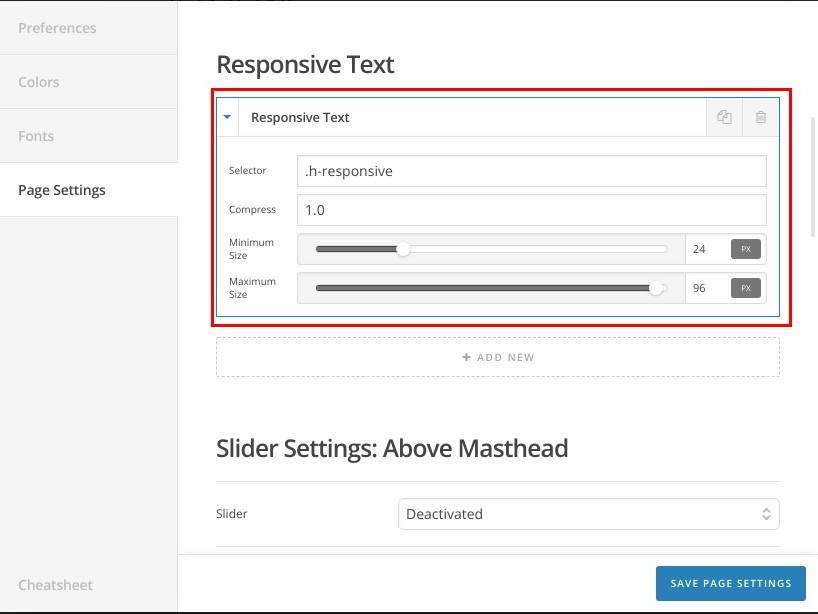
Hi Mark,

I’ve tried to log in your website with the WordPress Dashboard login details you provided but it keeps saying “Wrong username or password”.

I’ve checked your website and I can see you have added the custom CSS class “.h-responsive” correctly to your heading element, however, are you sure you have set the responsive text settings correctly:

Please double check the settings and recheck the username/password settings for us.

Thanks.

Hi,
There seems to be an issue with your secure note function and strong passwords - they appeared to be correct visually, but when copied/pasted they didn’t work - suggesting that hidden characters are being added or characters are being altered perhaps. To resolve I have surrounded them by tags. I have tested and they now work when copied from the secure note.
I have double checked the settings. I’ve watched videos and it simply doesn’t seem to work. Clearly I may well have missed something - but I am at a loss as to what.
I’d be grateful if you could take a look and advise what I’ve missed.
Thanks very much
Mark

Hello Mark,

I was able to logged in using the given credentials. I made sure that when I copy and paste, there aren’t no extra spaces in it.

What seems to be the problem here:

The responsive text is working correctly. The font size is different because you have implemented the h-responsive class in the headline element and into the direct h1 tag which made the difference. Please keep in mind that each element has its own font size which can be set in the element settings. Directly adding the class to the h1 tag will change the font size and not to follow the text responsive setting.

Hope this helps.

Hi,

I’m sorry, I don’t fully understand your response?

The text is not changing sizes for me.

I think you are suggesting that I should only use a class in one place? So, I have removed it from the

tag - it was only there because I was testing. So - now only the headline element has it applied. It is still not working for me.

I am using Firefox browser, but have also tried it in Chrome - it is not changing size for me.

To avoid confusion I have removed the Text element containg the

title from the page - just leaving the headline.

I have adjusted the responsiveness settings and can’t find any that make any difference to the headline responsiveness.

I hope someone can explain this to me in a way I can understand - and offer a solution.

Thanks

Mark

Hi @markwest,

Yes, you would need unique classes if you intend to apply different sizes. But, if those texts are meant to have the same sizes then it’s okay to use just a single class.

And the responsive text feature seems not recommended on this one. It doesn’t work, it always stay in 4px.

Please inspect your custom headline and add this to its font-size option.

calc(2vw + 14px)

That should make the text responsive with based size of 14px. And please remove the responsive text or else this CSS will not work.

Thanks!

This topic was automatically closed 10 days after the last reply. New replies are no longer allowed.