Translation of Pro

Hi there,

Either I am incredibly dumb (Probable) or I am missing something simple (probable).

I have followed all instructions with regard to translating Pro to en-NZ and put the files in the suggested folders, but nothing is translating.

I tried the child theme folder and added appropriate code to functions.php along with adding the files from framework/functions/pro/i18n to the child theme. That has not worked. I overwrote the files in the main theme framework/functions/pro/i18n folder and that worked, but that is it…

For the PRO Theme
What are the correct file names for x.pot to ???en_NZ.mo & ???en_NZ.mo and where should they be placed to work??
AND
Does one have to translate cornerstone.pot as well when using Pro? If so what filename should one use for the .mo & .po files and where should these files be placed?

I realise I have asked this a number of times and probably in different ways, thus receiving a slightly different response each time, along with asking for help via the FB Group (PM) but to date nothing has actually worked except overwriting the files as above.

Many Thanks in advance for your help

RickM
NZ

Hello There,

Thank you for the very detailed information. Before anything else, you will need to use the x.pot file found in Pro theme. Please find it in wp-content/themes/pro/framework/lang/x.pot. You will then need to save it as __x__-en_NZ.mo and __x__-en_NZ.po. You will have to upload it to /wp-content/languages/themes/.

For Cornerstone,you will also need the cornerstone.pot, save it as cornerstone-en_NZ.mo and cornerstone-en_NZ.po. This files should be uploaded in this location: /wp-content/languages/plugins/

Hope this helps.

Hi @RueNel, I think I have it or at least almost.

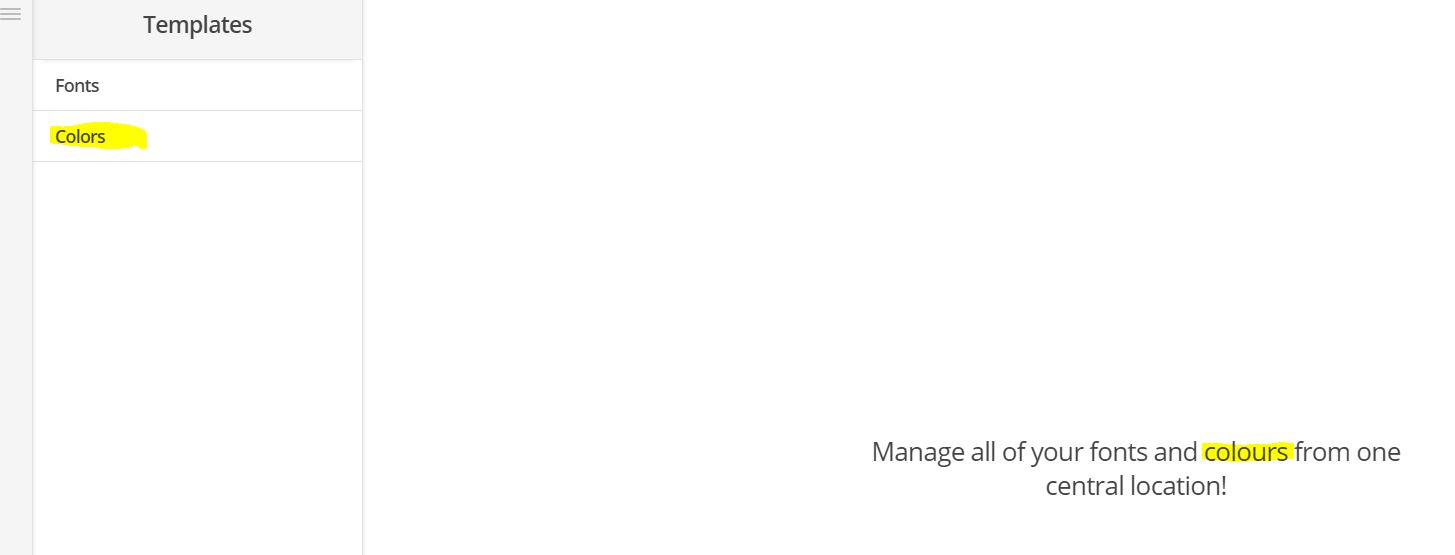
I cannot seem to find where this “Color” (highlighted yellow in pic uploaded) is located in the Pro Launch Templates Area. You can see I have the other “Colour” (highlighted) changed.

Help would be appreciated… :thinking:

Thanks Again for the help to date.

Rick M
NZ

Hello There,

Thanks for updating in! The x.pot file may need to be updated as it doesn’t include all the keywords. I can confirm that this is a bug and will report to our developers. Meanwhile, you can proceed and update your translation file using the x.pot. To be able to do that, please follow this instructions:

Hope this helps.

This topic was automatically closed 10 days after the last reply. New replies are no longer allowed.