Hello,
How can I define/change the color of my topbar content ?
(I’m using Ethos 1)
Thank you for your help,
Hello,
How can I define/change the color of my topbar content ?
(I’m using Ethos 1)
Thank you for your help,
Hi @Kimamori,
Thanks for writing in.
Would you mind sharing us a screen shot of which part of the topbar that you want to change.
Check your Theme Options > Typography or You could try adding this code in your custom CSS:
.h-entry-cover{
    color:#000;
}
.x-post-carousel-meta>span{
    color:#000;
}
entry-cover-categories{
    color:#000;
}
entry-cover-date{
    color:#000;
}
Hope i thelps.
Let us know how it goes.
Thanks.
Hello nico,
Here’s a screen shot. I would like to change the color of the text I have cercled in blue.
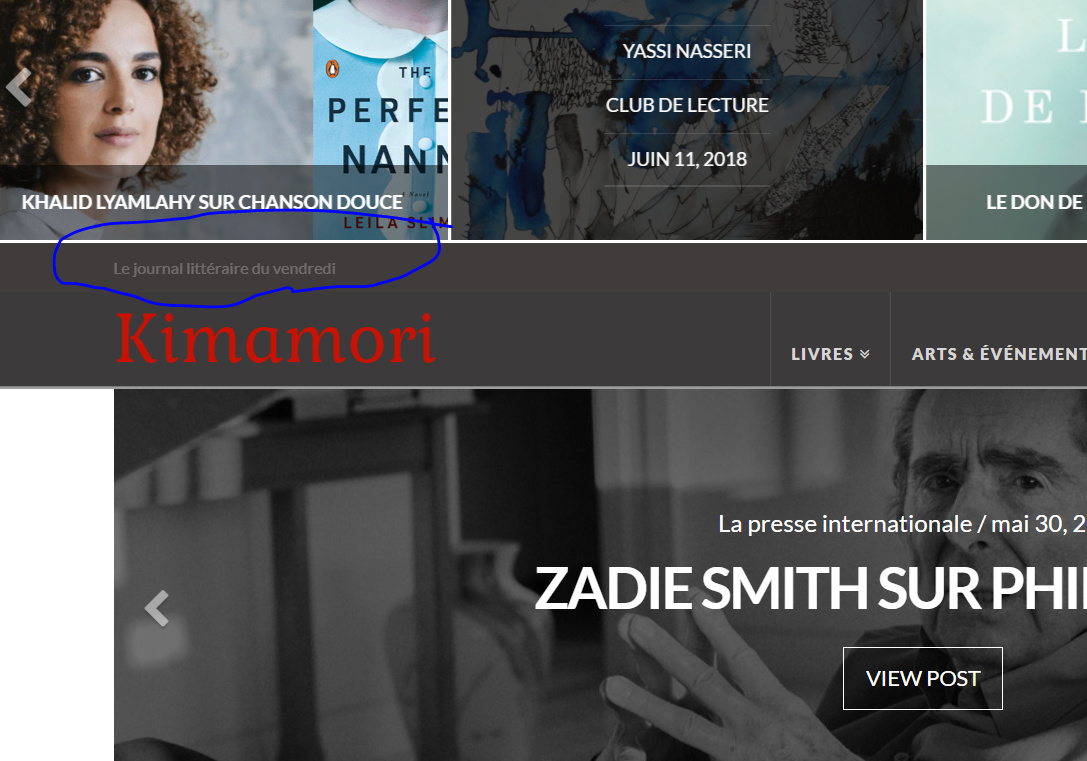
Thanks for your help,
Hi There,
Thanks for the clarification!
Please add this CSS to your theme option -> Global CSS
.x-topbar .p-info {
color: #fff; /* change this color code */
}
Hope this helps!
It worked out great.
Thanks,
On behalf of my colleague, you’re welcome. Cheers! 
This topic was automatically closed 10 days after the last reply. New replies are no longer allowed.