Topbar hover color/other topbar colors

From this thread: https://theme.co/apex/forum/t/change-social-icons-location-in-top-bar/30410/4?u=abwosp

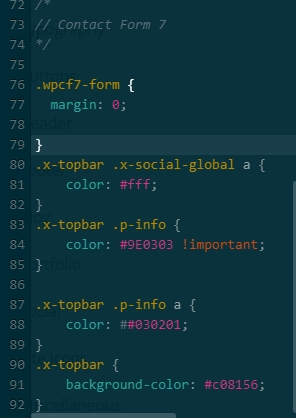
I added code, but now hover colors not working unless I have a } above code provided. But if I take the } the hover color works but not the topbar color.

And either way, I can’t change the social icons to the color I want…

Thanks,
M

EDITED to say, I found and extra # but that still didn’t address the problem, only the color)

.
1 Like

Hi there,

Thanks for writing in! There might be a missing curly bracket in the Theme Options > CSS section, please look out for any missing bracket and add it. You can also validate your CSS here https://jigsaw.w3.org/css-validator/#validate_by_input to find errors

In the mean time try adding the following code in your child theme’s style.css file:

.x-topbar .x-social-global a {
    color: #ddd;
}

.x-topbar .x-social-global a:hover {
    color: blue;
}

.x-topbar .p-info {
    color: #ddd !important;
}

.x-topbar .p-info a {
    color: #ddd;
}

.x-topbar .p-info a:hover {
    color: orange;
}

Hope this helps!

1 Like

Edited to update: I have it working now…thanks!

Front end and back end look totally different. I checked the code at the website given and it was fine, and I cleared cache…

Ideas???

Glad to hear that you got it working. :slight_smile:

1 Like

This topic was automatically closed 10 days after the last reply. New replies are no longer allowed.